Change one parameter. The model follows.
Parts, pages, nests and the folded 3D view update with it.
A CAD program that remembers how a design was built
ParametrIQ CAD is a 2D parametric CAD program for anyone who draws the same thing in many sizes: cartons and cases, sheet-metal blanks, gaskets, ducts, templates and dies. Each point is defined from other points and from variables, and every line, arc, text and dimension is drawn on those points. Change the length, and the drawing follows, flat on its page or folded up in 3D.
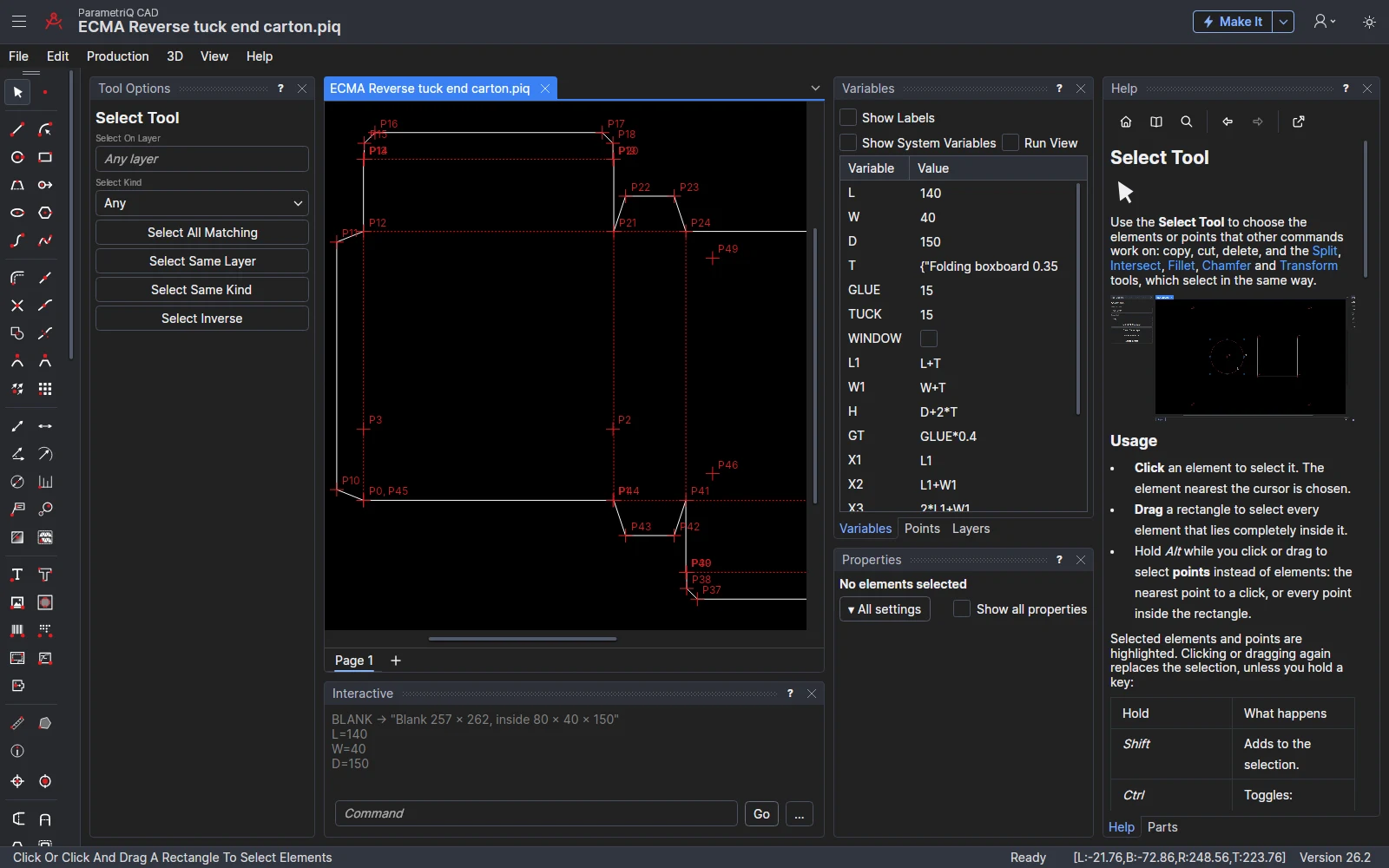
L=140 and D=110 were typed.
Draw on points, not positions
Snap modes
Twelve snap modes turn a click into a point defined from the drawing's other points: an existing point, straight across or up from one, at an angle, between two, a distance from two, along an element, mirrored and more. Type the distance by the cursor as you go, and it becomes a variable you can change later.
Variables
Every size has a name. Change a value in the Variables panel, or set it to an expression such as W/4 or MAX(L,W)/2. A change that would break the drawing is refused, and the old value kept.
Interactive commands
Type commands and expressions in the same language the drawing is saved in. Everything the mouse does can be typed, and what you type is kept as part of the design.
Dimensions that keep up
Ortho, parallel, angular, radius, diameter and ordinate dimensions, callouts and magnifiers. They are drawn on points too, so they always show the drawing's current sizes.
Parts and pages
Import one ParametrIQ drawing into another as a part that takes this drawing's sizes. Lay a design out over several pages that share its variables, so every page follows the same change.
Edits that stay parametric
Fillet, chamfer, split and intersect add points defined from the elements they work on, with radii and distances kept as variables, so the edits follow when the drawing changes size.
Tools for your trade
Each drawing says which industry it is drawn for, as part of its classification. The toolbar and Edit › Tool then offer that trade's tools beside the general drawing, editing and dimensioning tools, so other trades' tools stay out of the way; Edit › Tool › Show All Tools offers every tool, whatever the drawing is for. A drawing made from a Run Parametric design, or with a trade's materials, has its industry set for you.
Every tool is parametric, whatever its trade: the sizes you type become variables, and what it draws is defined on the points you pick, so it follows when the drawing changes size.
 Packaging
Glue, tuck and dust flaps, windows with their film patch, lock tabs and slots, crease offsets, curved bends, bridges, notches and tear strips.
45 designs
 Sheet metal
Flat patterns, bend lines, corner reliefs, hole patterns, slots, louvers, seams and hems, rectangle-to-round transitions, elbow gores, gussets and part marks.
14 designs
 HVAC
Flat patterns and bend lines, rectangle-to-round transitions, elbow gores, pipe saddles, mitre segments, reducers, seams and hems, and louvers.
13 designs
 Pipework
Pipe saddles, mitre and lobster-back segments, reducers, weld preparations, weld numbers for the weld map, gasket rings and hole patterns.
9 designs
 Structural steel
Base plates, gusset plates, beam copes, weld preparations, weld numbers, hole patterns, slots and part marks.
9 designs
 Gaskets
Gasket rings to EN 1092-1 and ASME B16.5, hole patterns, slots, tabs, leads and bridges.
8 designs
 Laser cutting
Tabs, leads, finger joints, living hinges, mortise and tenon, fixing holes, outline text and stencil bridges.
13 designs
 Carpentry
Mortise and tenon, dovetails, housings and rebates, finger joints, hinge bores, routing insets and mitre frames.
11 designs
 Sewing
Seam allowances, notches, grain lines, darts, pleats, buttonholes, stitch and fold lines, and piece labels.
16 designs
 Sign making
Corners, fixing holes, routing insets, outline text, stencil bridges, weed borders, contour cuts and tiling.
7 designs
 Picture framing
Mount apertures, multi-aperture mounts, V-grooves and mitre frames.
5 designs
 Vinyl cutting
Weed borders and weed lines, HTV mirror, contour cuts, tiling and colour separation.
6 designs
 Carpets and flooring
Room outlines, roll layouts with their seams and waste, pile arrows, doorways, stair templates, rug borders and inlays.
7 designs
 Labels
Label layouts round the die cylinder's repeat, liner slits, registration marks and contour cuts.
4 designs
 Leather goods
Stitch lines, skives, fold lines, piece labels, seam allowances, notches and bridges.
6 designs
 Foam and inserts
Foam layers, pockets with finger pulls, shadow pockets, tabs and bridges.
3 designs
 Glass
Edge allowances, fitting notches, corners, holes, cut-outs and water-jet inlays.
4 designs
 Stone and tile
Sink and hob cut-outs, tile setting-out, drainer grooves, water-jet inlays, edge allowances, edge profiles and slab photos.
4 designs
Production tools
Registration marks and drill holes are offered for every industry. The die-maker's bridges, notches and tear strips come with the trades that cut with a die or a knife: packaging, labels, laser cutting, gaskets, foam and leather. Registration marks, drill holes and other marks go on the standard production layers (Registration, Drill, Etch, Engrave …), which every export and report knows how to treat: see Standard production layers.

Registration marks
Dots for a digital cutter's camera, or rings and targets for the printer, placed where you click or round the design: at four corners, or at three so the cutter can tell which way round the sheet is. They print on every plate and are never cut, and their size and offset are variables every mark shares.

Drill holes
A hole at each point you click, on a layer that G-code and the post-processors drill rather than cut. The diameter is a variable: change it and every hole changes, and each hole moves with its point.
Bridges
Put bridges on a rule where you click, or spread them along it by a count or a spacing, set in from the ends or doubled; full height, or notched on the left, right or both sides. Make Die bridges the other rules run by run: in symmetric pairs, kept away from corners and crossings, with a width for each kind of rule and for short and long runs. The Properties panel shows what bridges the selected rules have.

Notches
A V or U notch cut into an edge where you click: a folding notch on a blank, a relief in a gasket, a finger notch in foam. Pattern pieces get their own notches on the seam line. Each keeps its place along its edge, and its width and depth are variables.

Tear strips
Two perforation lines side by side between two points, the strip of board between them torn away to open the pack. The lines are defined on the points, and the strip's width is a variable the next strips share.
Run Parametric: a design library you fill in
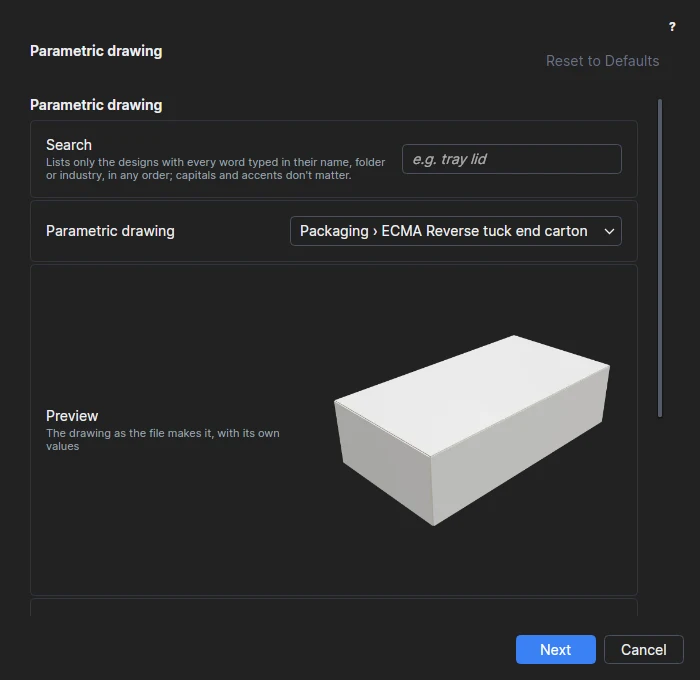
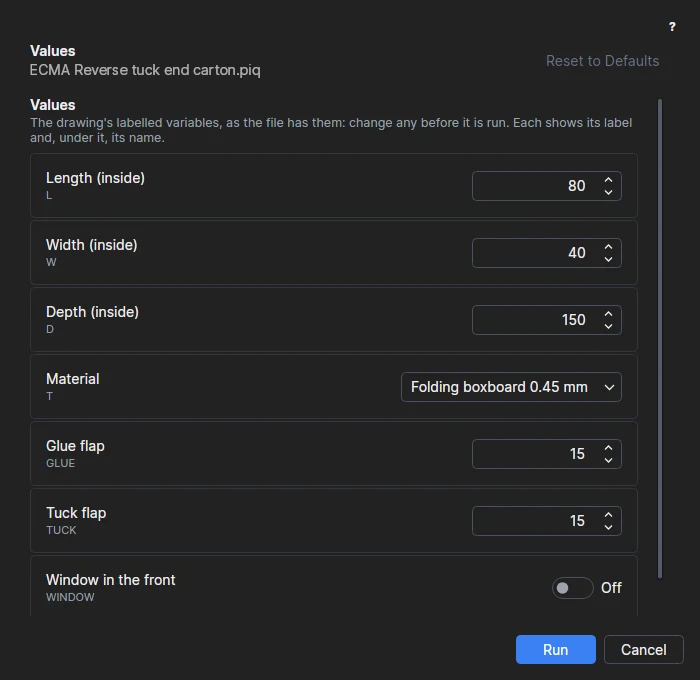
File › Run Parametric… lists ready-made parametric drawings by trade. Pick one, see a preview, and fill in the values it asks for: length, width and depth, the material, a glue flap, whether it has a window. It draws a new drawing with those values, and the board's or sheet's thickness is allowed for in every panel, flap and slot.
- Packaging: more than 40 styles. FEFCO 0200, 0201, 0202, 0203, 0204 and 0427; ECMA reverse tuck, straight tuck and seal end cartons; crash-lock and snap-lock bottoms, mailers, pizza boxes, bakery and gift boxes, display trays, bottle carriers and partitions; sleeves, pillow boxes, trays, telescope base and lid, matchbox drawer and sleeve; hexagonal, triangular, gable-top and pyramid cartons.
- Other trades: sheet metal (enclosures, brackets, channels, chassis, vent panels, cable tray), HVAC ducts, elbows, transitions and reducers, pipework templates, structural steel base plates, splices and cleats, EN 1092-1 and ASME flange gaskets, laser-cut boxes, gears and signs, carpentry (stair stringers, rafters, cabinets, frames, dovetails), sewing patterns, sign panels, plaques and stencils, vinyl lettering and decals, picture mounts and frame cut lists, rugs, runners and room cut plans, roll and sheet labels, wallets, belts and straps, foam case inserts and shadow boards, mirrors, shower screens and splashbacks, and worktops, vanity tops and tile layouts: 139 designs from 17 trades.
- Your own: any .piq file in your Parametric folder is listed too, with its labelled variables as the questions.
Nesting that stays parametric
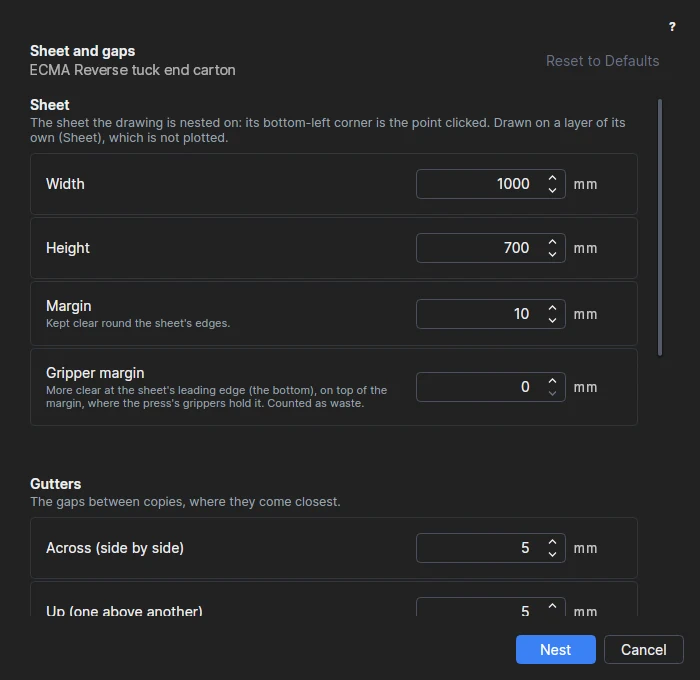
The Nest tool lays a page out on a sheet as many times as it fits, in rows and columns, with the margin and gutters you set. It can turn the part a quarter, or turn every other column or row half round so shapes interlock, and it tells you the copies per sheet, the sheets needed and the wastage. The nest is parametric too: make the box longer and the sheet is laid out again; draw more on the part and every copy shows it.
Barcodes, symbols and drawing sheets
Barcodes and QR codes
An EAN-13, EAN-8, UPC-A, UPC-E, ITF-14, Code 128, GS1-128, QR code, Data Matrix, GS1 DataMatrix or PDF417, placed with the Barcode tool or the BARCODE command on four points, so it moves and scales with the drawing. Its data can be worked out from the drawing's variables, and the code is made again when they change.
Packaging symbols
The parts library has the marks printed on packaging: handling marks in the style of ISO 780, the recycling loop and the plastic resin codes, the ℮ sign, period after opening, registration and crop marks, and grain and flute arrows. Each is sized by one variable and goes on a layer that is printed, never cut.
Drawing sheets and borders
A sheet puts a border round a page, ready to print: an ISO 5457 or ASME Y14.1-style frame with zones, and a title block filled in from the drawing. Its viewport shows the page fitted, or at a standard scale such as 1:2. The borders are parametric drawings too, so one serves several sheet sizes, and the sheet follows when the drawing changes.
See it work
From drawing to production
Fold it in 3D
3D › Fold in 3D folds the design up on a page of its own, in the look of its material, step by step in a natural order or one you set. Import a model to see the product in its pack, cut holes where it passes through, and export the folded design to glTF, OBJ or STL.
Make the die
Production › Make Die… draws the steel-rule die: the rules with bridges and nicks, the die sheet, holes, support bars and stripping, with the rule it takes and an estimate of its cost. It draws the ejection rubber, kept off the creases, and the crease counter plate too, and the design rules that come with the app catch a crease too near a cut or a bridge too near a corner.
Bleed and safe zones
Production › Bleed and Safe Zone… marks the bleed round each blank and the safe zone inside each panel for the artwork, and layers can go to PDF, EPS or Illustrator as spot colours.
Grade sizes
Production › Grade Sizes… draws a pattern in every size of its size table at once, each on a layer of its own, so you can check they step evenly. Import the sizes from a spreadsheet with File › Import › Import Design Table…
Constraints
Edit › Constrain makes lines horizontal, vertical, parallel, perpendicular or equal, or points coincident, and a dimension can drive the drawing: change its value and the drawing follows.
Ask Claude
File › Ask Claude… writes a parametric drawing from a description, such as "a reverse tuck end carton with an optional window", checks it, and opens it with its sizes and options as variables you can change.
New from Product
Start from what you're packing - six bottles of wine, twelve cans - and get one finished drawing: the case, the fitment that holds the products apart and any divider pad, sized, costed and ranked, folded in 3D with a product in every cell. The Pack Designer's Pack These… hands its pack straight to it.
Accessories and fitments
Carry handles, euro hang tabs, window film, ribbon pulls, magnets, drawstrings, D-rings, stand-offs and more: parametric parts that cut what they need, show in 3D and are costed from one shared price list. Check Dieline finds their holes too close to a fold, the edge or each other.
Easier to start, easier to find
A start page, Simple mode, a command palette (Ctrl+K) that finds any command, tool, setting or help page, help beside what you're working on, Make It, units typed into number boxes, plain error messages with fixes, and guided tours through your first design.
Proofs anyone can open
Send a customer or a colleague the folded design, not just the flat blank. Each of these is written from a 3D page, in a form they can open without ParametrIQ.
HTML proofs
One HTML file that opens in any recent web browser, on a computer, a phone or a tablet, with nothing to install. They can turn it, zoom in and play the fold, and on phones and tablets that can, see it life-size in augmented reality.
AR proofs for iPhone and iPad
A USDZ file that an iPhone or iPad opens by itself from Mail, Messages or Files. AR Quick Look folds the pack up and stands it on a table or the floor at its real size.
3D PDF
A PDF page with the folded design on it in 3D, as PRC or U3D, folding up when the page opens. Adobe Acrobat and Adobe Reader show it in 3D; other PDF viewers show a picture of it.
Proof images and video
Pictures of the folded design from the front, from above, in a three-quarter view and more, or the flat dieline over the artwork, and a video of it folding up or turning round, as MP4 (on Windows), animated WebP or GIF.
glTF with artwork and folding
glTF and GLB models keep each panel as a part hinged to the one it folds from, the fold as animations and the artwork as textures, for web pages, rendering and other 3D programs.
COLLADA, PRC and U3D
Read and write COLLADA (.dae and .zae), PRC and U3D models, as well as glTF, OBJ and STL: show a product in its pack, or pass the folded design on to other 3D programs.
Talks to your machines and your other software
Import a drawing from another program and its lines and arcs come in joined, ready to be made parametric. Export to the format your die maker, cutting table, plotter or printer expects.
| Format | Import | Export | Used for |
|---|---|---|---|
| DXF and DWG | ✓ | DXF | Exchanging drawings with other CAD programs |
| Stone templates (DXF) | ✓ | Countertop templates measured on site with a digitiser (Prodim Proliner, LT-55 …): pieces, cut-outs and edge profiles | |
| AAMA/ASTM pattern DXF | ✓ | Sewing and leather patterns for apparel CAD, marker making and cutting rooms | |
| CF2 | ✓ | ✓ | Die makers, die saws and lasers |
| DDES3 | ✓ | ✓ | Die makers, counters and strippers |
| Rule benders (CF2, DDES3) | ✓ | Automatic rule benders, with a report of how each rule is bent | |
| G-code | ✓ | ✓ | CNC routers, mills, lasers and plasma |
| DSTV NC | ✓ | Steel fabrication: beam lines, plate drilling, punching and plasma cutting, a file for each piece | |
| IFC steel model | ✓ | BIM programs: the steel pieces as an IFC4 model, with holes, copes, marks, grades and weights | |
| DXF with bend data | ✓ | Press brakes and sheet-metal CAM: the flat blank with its bend lines, ways, angles and radii | |
| STEP folded part | ✓ | Mechanical CAD: a sheet-metal or duct part folded up as a solid | |
| HP-GL and HP-GL/2 | ✓ | ✓ | Plotters, sample tables and vinyl cutters |
| GP-GL (Graphtec) | ✓ | Graphtec cutting plotters, with the speed, force and blade offset in the file | |
| Mat cutter DXF | ✓ | Computerised mat cutters: a mount's straight, bevel and V-groove cuts, in cutting order | |
| Mat cutter HP-GL | ✓ | Computerised mat cutters that import plot files, a pen for each kind of cut | |
| LightBurn | ✓ | Lasers: a LightBurn project, layers set to cut, score or engrave | |
| SVG for Glowforge and xTool | ✓ | Glowforge and xTool lasers: size in millimetres, a colour for each operation | |
| SVG for Cricut and Silhouette | ✓ | Cricut Design Space and Silhouette Studio, at true size, a colour for each operation | |
| PDF, EPS and PostScript | ✓ | ✓ | Proofs, printers and RIPs |
| Dieline PDF (print-ready) | ✓ | Printers and packaging designers: cut and crease on spot colours, overprinting, with bleed and safe-area guides | |
| Print-and-cut PDF and EPS | ✓ | Printer-cutters and their RIPs: the artwork printed, the CutContour paths cut, registration marks | |
| Tiled print (PDF) | ✓ | Patterns and templates full size on A4, A3 or Letter sheets, to tape together | |
| Projector PDF | ✓ | A projector over the cutting table: the pattern full size on the fabric, leather or carpet | |
| Wrap-around templates (PDF) | ✓ | Pipework templates full size on sheets to tape together, marked for wrapping round the pipe | |
| Adobe Illustrator and SVG | ✓ | ✓ | Artwork, packaging design and the web |
| PNG, JPEG and WebP | ✓ | Documents, e-mail and web pages | |
| glTF and GLB | ✓ | ✓ | 3D models with the artwork as textures and the folding as animations |
| OBJ and STL | ✓ | ✓ | 3D models: the product shown in its folded pack, and the folded design for other 3D programs |
| COLLADA | ✓ | ✓ | Exchanging 3D models with other 3D programs |
| PRC | ✓ | ✓ | 3D models for 3D PDF (ISO 14739-1) |
| U3D | ✓ | ✓ | 3D models for 3D PDF (ECMA-363) |
| 3D PDF | ✓ | Proofs that turn and fold in Adobe Acrobat and Adobe Reader | |
| USDZ | ✓ | AR proofs for iPhone and iPad | |
| HTML proof | ✓ | Proofs that open in any web browser, with AR on phones and tablets that can | |
| MP4, animated WebP and GIF | ✓ | Videos of the design folding up or turning round (MP4 on Windows) | |
| TOPS Pro | ✓ | Pallet loads: the case, for TOPS Pro's TOPSData import | |
| Cape Pack | ✓ | Pallet loads: the folded case as a COLLADA shape, with its sizes |
File › Export › Export… offers the formats for the drawing's industry first. A machine profile sends the drawing to one machine in one click: the format and its options, the layer names, colours and pens the machine expects, the units, the folder and the file name. ParametrIQ CAD comes with profiles for each trade's machines (rule benders, lasers, cutting plotters, steel lines, mat cutters …), and you can make your own. See Export by industry and machine profiles.
Around the drawing
Pallet software
Export a case to TOPS Pro, as the file its TOPSData import reads, or to Cape Pack, as a COLLADA model of the folded case with its sizes listed for you to type in. The sizes, the board and the box style come from the drawing.
Send by email
File › Send by Email sends any export, a report, a proof or the drawing itself by email, attached to a message that says what the drawing is and its sizes. ParametrIQ sends it for you, with replies to you, or it opens in your mail program for you to send.
Linked or embedded
Pictures, vector pictures, library parts and 3D models can be kept inside the drawing, or linked to a file or a web address and read again when the drawing opens, so a new version of a shared logo or part reaches every drawing that uses it.
Autosave and recovery
Drawings with changes not saved yet are copied every two minutes, and offered back if ParametrIQ or the computer stops. A drawing that would read files outside its own folder asks before it does.
Drawing index and classification
Give a drawing a classification (its category, a style such as FEFCO 0201, the product, tags) for AI and for finding it again. Turn on the drawing index and each save writes a JSON file about the drawing, ready to load into a database, and save extensions can record it anywhere else.
Board and inch sizes
Materials can say what the board is: solid or corrugated, its flute, and which way its grain runs, as variables a design can use. For inch drawings, NEARESTFRAC rounds a size to the nearest fraction of an inch, such as 3 5/8.
Report a problem
Help › Report a Problem… sends us what went wrong, with pictures of the program as it was. Black out anything you'd rather we didn't see, choose whether the drawing goes too, and preview exactly what will be sent before you send it. Your licence key and passwords are never sent.
Post-processors
Write a drawing for a machine in the form it wants: its own G-code dialect, a header and footer, a plotter's speed and force, a laser's power codes.
Design rules
Catch problems before a job is cut: an outline that doesn't close, a cut too short for the knife, a line drawn twice, a crease too near a cut, a rule bent too tight, a hole too near the edge of a glass or stone panel.
Templates and reports
Build a new drawing from a few dimensions, or count and measure one: cut and crease lengths by layer, the rule a die needs and how each rule is bent, the blank's size, a board cost and wastage quote, a laser job's time and cost, a frame's moulding order; and for each trade, a steel cutting list, a bend table, a duct fitting schedule, a weld map, a glass order list, a panel cut list, a carpet roll cut list, and foam, gasket and stone quotes.
Automation scripts
Open, change, export and save drawings without the app's window, for an order or database system or a batch of files: run PiQ run script.js from the command line, or File › Extensions › Run Script…
Commands, menus and dialogs
An extension package adds its own commands to the menus and toolbar, with shortcuts, and forms and picks that ask for values or points in the drawing; File › Extensions › Run Command… finds any command by name.
Camera registration
Cutters, plotters and lasers with a camera can fit a job to the material: a machine profile that names a camera registration extension asks where the camera found the registration marks, and writes the job corrected for stretch, skew and a roll that wanders.
Extensions are plain JavaScript files with access to the drawing's variables and points. Some come with the app; change them or write your own. Read about extensions.
Get ParametrIQ CAD
Included in every plan. Install it, activate it, and start with File › New or File › Run Parametric…