BOOLEAN
A shape made by a Boolean operation on the areas that two sets of elements close off, A and B: everything in either (union), only what they share (intersect), A with B cut out of it (subtract), what is in one but not both (exclusive), or A cut into pieces along B (split). It is one element, worked out again whenever its elements change, so it follows them.
Syntax
BOOLEAN "operation",[@a,…],[@b,…]
BOOLEAN @id,"operation",[@a,…],[@b,…],layer
BOOLEAN @id,"UNION",[@a,…],layer
| Argument | Meaning |
|---|---|
| operation | "UNION", "INTERSECT", "SUBTRACT" (A − B), "XOR" (in A or B, not both) or "SPLIT" (A cut along B). Any case. |
| [@a,…] | The elements of A, as a list. |
| [@b,…] | The elements of B, as a list. A union can leave it out: the area A closes off, overlaps welded. |
The id, layer and any settings after it are the element settings. Without a layer, the result goes on the current layer; the Boolean Tool writes A's layer, or the one you choose.
What closes off an area
Any elements will do, and A and B can each be several:
- lines, arcs, Béziers, splines, ellipses and polylines (with bulges or not), closed one by one, or meeting end to end: four separate lines round a square close it off;
- text: its letters' outlines (a TrueType font's; a stroke font's letters are lines and close off nothing);
- blocks, placed parts and imported vector pictures (SVG, DXF, PDF, AI …): the curves they draw.
Shapes that touch or cross one another are welded together (two overlapping circles are one area); shapes inside one another alternate, filled and hole, so a mount board and its aperture give a ring, and a letter O its counter. Lines inside a shape don't divide it, and open curves close off nothing, except as SPLIT's cutting lines.
Examples
P1=[0,0]
P2=[100,0]
P3=[100,100]
P4=[0,100]
POLYLINE @1,[P1,P2,P3,P4],TRUE
P5=[100,50]
P6=[140,50]
CIRCLE @2,P6,P5,TRUE
BOOLEAN @3,"UNION",[@1],[@2]
BOOLEAN @4,"SUBTRACT",[@1],[@2]
BOOLEAN @5,"INTERSECT",[@1],[@2]
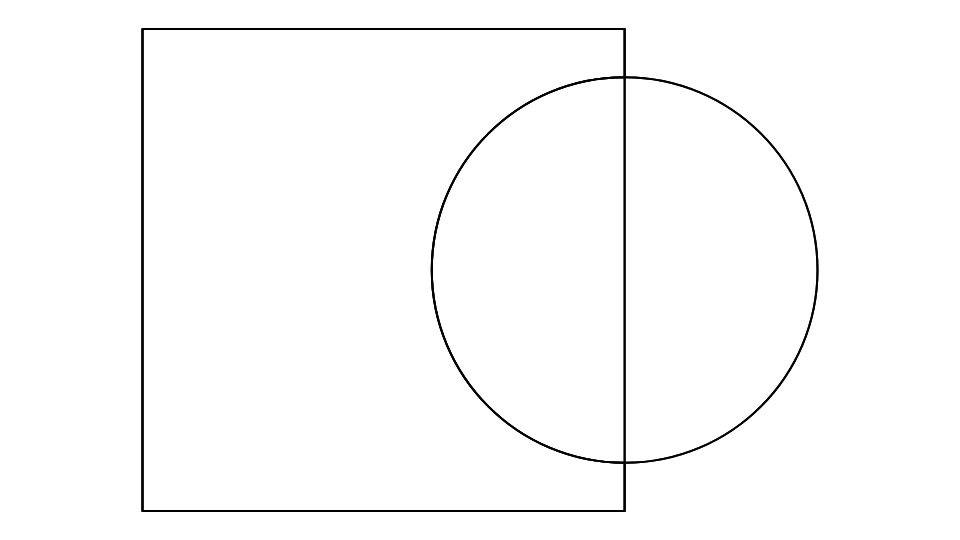
A square and a circle over its right-hand edge: their union, the square with a round bite out of it, and the half circle they share. The arcs stay arcs: move P5 and all three follow.
P1=[0,0]
P2=[400,0]
P3=[400,500]
P4=[0,500]
POLYLINE @1,[P1,P2,P3,P4],TRUE
P10=[200,260]
P11=[290,260]
CIRCLE @2,P11,P10,TRUE
P20=[200,420]
P21=[230,330]
P22=[330,330]
P23=[250,280]
P24=[280,190]
P25=[200,240]
P26=[120,190]
P27=[150,280]
P28=[70,330]
P29=[170,330]
POLYLINE @3,[P20,P21,P22,P23,P24,P25,P26,P27,P28,P29],TRUE
BOOLEAN @4,"SUBTRACT",[@1],[@2,@3]
P30=[-24,-24]
P31=[424,-24]
P32=[424,524]
P33=[-24,524]
POLYLINE @5,[P30,P31,P32,P33],TRUE
BOOLEAN @6,"UNION",[@5],[@4]
Picture framing: a logo (a circle and a star that overlap, as an imported SVG gives them) cut out of a mount board, for a shaped aperture; then the mount welded to the frame's outline round it, the logo's aperture its one hole.
P1=[0,0]
P2=[120,0]
P3=[120,180]
P4=[0,180]
POLYLINE @1,[P1,P2,P3,P4],TRUE
P5=[60,150]
P6=[60,220]
CIRCLE @2,P6,P5,TRUE
BOOLEAN @3,"INTERSECT",[@1],[@2]
Packaging: a carton panel and the round shape of its artwork's window; the window cut is what of the shape is on the panel (the circle, flattened where the panel's top and sides cut it off).
P1=[0,0]
P2=[200,0]
P3=[200,40]
P4=[0,40]
POLYLINE @1,[P1,P2,P3,P4],TRUE
P5=[20,30]
TEXT @2,P5,"SIGN",40,0
P6=[100,-10]
P7=[100,50]
LINE @3,P6,P7
BOOLEAN @4,"UNION",[@1],[@2]
BOOLEAN @5,"SPLIT",[@1],[@3]
Sign making: a backing plate with the lettering standing on it, welded into one outline to cut (with a TrueType font; the default stroke font's letters are lines, so they add nothing), and the plate split in two by a line across it (each half one shape of the result).
Notes
The result's curve is its shapes' loops one after another: each outside anticlockwise, then its holes clockwise. Its edges are pieces of the elements' own curves, cut exactly where they cross: lines stay lines, arcs arcs, Béziers Béziers and ellipses ellipses. Where two curves have no formula for where they cross (two Béziers, say), the crossing is found on the true curves to the tolerance, and the curves are cut there, not turned into short lines. The tolerance is a millionth of the size of the elements (and never less than 0.000001): ends that close are taken as meeting, and pieces of the result that lie within ten times it of one line or circle are joined back into one.
If nothing is left (an intersection of shapes that don't overlap), the result is a point where the shapes were. If one of its elements is deleted, it is kept on the Construction layer, as for any element something else is made from.
AREAOF gives the result's area, OFFSET a line round it, and the Fill Tool fills it; it can be one of the shapes of another BOOLEAN.
See also: Boolean Tool, FILL, CONTOUR.