Housing Tool
Use the Housing Tool to mark a housing (a dado: the groove across a board that a shelf sits in) or a rebate (a step cut along an edge, for a back panel or a picture's glass): lines parallel to an edge, at their distances in from it.
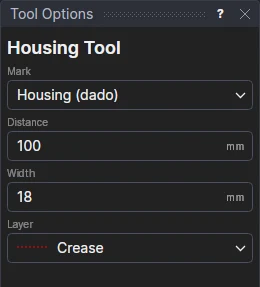
Usage
- Choose what to Mark: a Housing (dado) or a Rebate.
- For a housing, fill in its Distance (from the edge to its near side) and its Width (the shelf's thickness); for a rebate, its Width from the edge.
- Choose the layer: a dashed one for marks, such as Perforation.
- Click the edge they are measured from. On a closed outline they go into it; on a line, on the side of it you click. The marks are shown as you move.
Along a straight edge (a line, or a straight side of a polyline) the marks are lines across the board from the edge's two ends. Along a curve, or round a whole outline when it isn't straight, they are OFFSETs of it: a picture frame's rebate all round, say.
Marks that follow the drawing
The marks are drawn from the edge's ends and from new variables: the housing's distance (HSD1) and width (HSW1), or the rebate's width (HSW1). Move the edge, or change a variable, and the marks follow. The boxes then show the variables, so the next marks share them: change a shelf's thickness once, and every housing for it changes.