Edge Profile Tool
Use the Edge Profile Tool to say how a stone piece's edges are finished — polished, bullnosed, ogee … — for the shop and for the Stone quote, which prices each profile by the metre (foot).
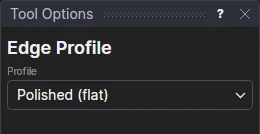
Usage
- Choose the Profile: Polished (flat), Eased, Pencil round, Half bullnose, Full bullnose, Bevel, Ogee, Cove, Mitred or Waterfall.
- Click each edge that has it: a line, an arc, a circle, or a side of a polyline (a digitiser template's outline, a worktop you drew). The side the click is nearest is lit before you click.
- To change an edge's profile, choose another and click it again. To take a mark off, delete it.
Each edge is marked with a line along it on its profile's layer — Edge Polished, Edge Full bullnose … — made the first time it is used, in a colour of its own. The mark is on the edge's own points, so it follows the edge when it moves. It says how the edge is finished; it isn't a cut: the layer isn't plotted, so G-code and HP-GL leave it out, and a machine profile can leave the Edge layers out of a DXF for a saw, or keep them for a CNC that profiles edges layer by layer.
Edges against a wall, or under an upstand, are left unmarked.
Notes
- Any line on a layer whose name starts with Edge counts as an edge of the profile its name says, however it was drawn: draw one with the line tools on an Edge Ogee layer of your own, or name a layer so in a DXF.
- A library design's edges are drawn by the design itself: choose their profile in the design's values where it offers one, or mark them after with lines on the profile's layer.
See also: Stone and Tile, Slab Photo Tool.
In 3D
A 3D page shows a worktop made solid by its layer with its marked edges shaped to their profiles (Wrapping and sweeping).