Crease Offset Tool
Use the Crease Offset Tool to move a crease by a number of board thicknesses: the allowance a fold needs (a panel that wraps outside another is a thickness bigger, one folded inside it a thickness smaller), or to turn a design drawn to inside sizes into one drawn to outside sizes. The crease stays defined on where it was, so it keeps following the design. It is a tool of the packaging trade.
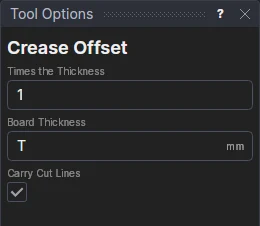
Usage
- Fill in Times the Thickness: how far to move the crease, in board thicknesses (1 for one thickness, 0.5 for half of one, 2 for two).
- Fill in the Board Thickness. It starts on the drawing's thickness variable T, if it has one (a drawing
started from a corrugated or folding-carton material does). Type
CAto move it by the material's crease allowance instead. - Leave Carry Cut Lines ticked to move the cut lines that end on the crease with it (see below); untick it to leave them where they are.
- Click a crease, on the side to move it to. It must be a straight line (a line segment). Click more creases to move them the same way.
The crease's new place is shown as you move the pointer.
What it draws
The crease clicked is kept on the Construction layer, and a new line on its layer (the Crease layer, usually) takes its place, the offset away, square to it.
With Carry Cut Lines ticked, the lines and polylines on cutting layers that end on the old crease end on the new one instead, so the outline stays closed round the moved panel:
- an end at one of the crease's ends goes to the new crease's end;
- an end at a point along the crease goes to a new point the same offset from that point (so it follows too);
- a polyline's corners on the crease move the same way.
A cut lying along the crease (both its ends on it) and lines on the Construction layer are left as they are, and so are the points themselves: anything else drawn on them stays. Unticked, the lines that meet the crease are left as they are: move their ends too if they should follow (or draw them on the new crease's ends).
It follows the drawing
The times is kept in a new labelled variable (CRK1), and the thickness is the drawing's T as it
is (or a new variable, CRT1, when you type a number). The next creases share them, so changing CRK1 moves them all.
The new crease's two ends are new points defined on the old crease's ends (POLAR square to it, CRK1×T away), so
the new crease follows the old one, the times and the material chosen.
Worked example
A tray whose end walls fold up outside its side walls needs its end walls' creases a thickness further out than the bottom's inside length. Draw the bottom to the inside size with a crease on each edge. Click the two end creases, each on its outer side, with Times the Thickness 1: they move out by T. Then draw the end walls on the new creases' ends (with the Panel tool, say), so they follow them. Choose another material, and the creases and the end walls move by its thickness.
See also: Offset, Lock Tab and Slot, Materials, Packaging.