Base Plate Tool
Use the Base Plate Tool to draw a column base plate round its centre: the plate, its holding-down bolt holes round its edge at the edge distance in, and a grout hole in the middle. It is a tool of the structural steel trade.
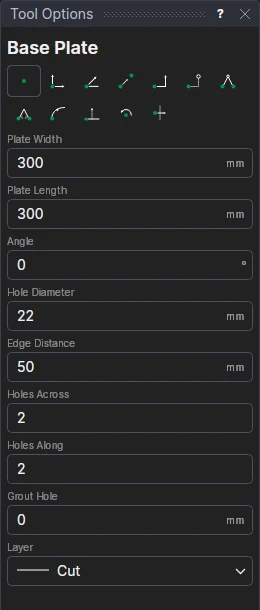
Usage
- Fill in the Plate Width (along X) and Plate Length (along Y), and the Angle the plate is turned by.
- Fill in the Hole Diameter (the bolt's clearance hole: 22 mm for M20, 26 mm for M24), and the Edge Distance from the plate's edges to the holes' centres.
- Fill in how many Holes Across and Holes Along (at least 2 each): the holes go round the edge of that grid, so 2 by 2 is four bolts at the corners, 3 by 2 six, 3 by 3 eight.
- Fill in the Grout Hole diameter (0 for none).
- Choose the layer to draw on.
- Click* the plate's centre (the column's centre). The plate is shown as you move.
The edge distance must be at least half the hole's diameter, and leave the holes inside the plate.
It follows the drawing
The sizes and counts are kept in new labelled variables (BPW1, BPL1, BPA1, BPD1, BPE1, BPX1, BPY1, BPG1), and the plate and holes are drawn by a block on the centre you marked: change BPY1 to 3 and two more holes appear; move the centre and it all follows.
*Depending on the chosen snap mode, several clicks may be required to define the point parametrically. Read more about Snap Modes
See also: Gusset Plate, Hole Pattern, Structural Steel.