POLYLINE
A chain of straight lines and arcs through a list of points.
Syntax
POLYLINE [points]
POLYLINE @id,[points],closed,layer,[bulges]
| Argument | Meaning |
|---|---|
| [points] | The points it passes through, in order: [P1,P4,P5] or [P1..P5]. |
| closed | TRUE to join the last point back to the first (optional: FALSE). |
| [bulges] | How much each segment bulges into an arc, one number per segment: 0 straight, 1 a half circle, positive anticlockwise, negative clockwise (optional: all straight; NIL for none). Each is tan(¼ of the arc's angle), as in DXF files. |
The id, layer and any settings after it are the element settings.
Examples
POLYLINE @1,[P0..P3],TRUE
POLYLINE @2,[P0,P1,P2],FALSE,1,[0,0.4142]
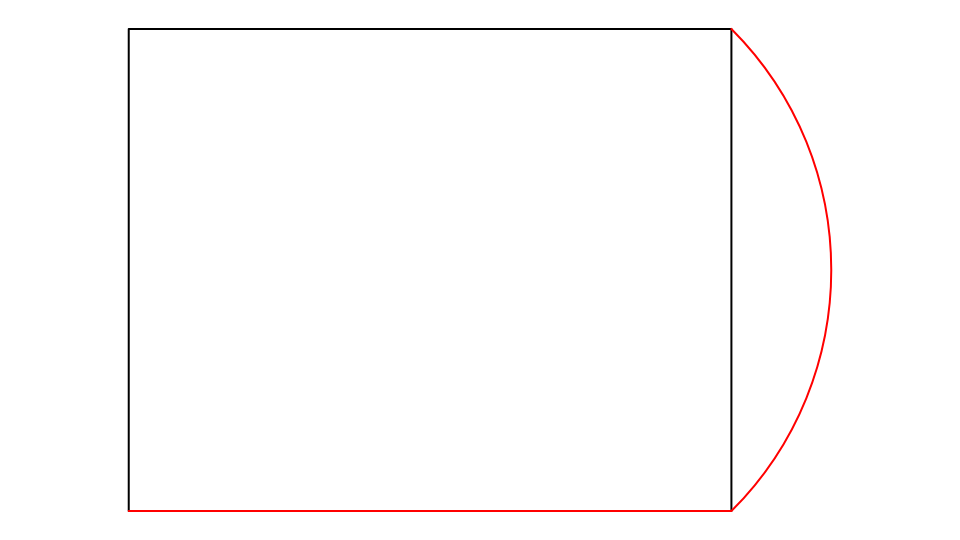
The first is the box's outline; the second, on layer 1, runs along the bottom and then turns up to P2 with a quarter circle.
Notes
A polyline is cut and selected as one element. EXPLODE breaks it into its lines and arcs.
See also: SPLINE, Polygon Tool, Rectangle Tool.