Viewport Tool
Use the Viewport Tool in a border drawing to draw a viewport: the rectangle where a sheet placing the border shows a page of its drawing (see Drawing sheets and borders). It is pinned to the two corner points you click, so it follows them as the border's size changes.
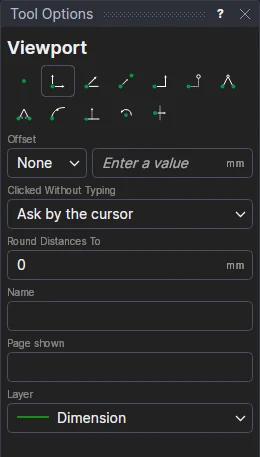
Usage
- Type its Name if you like (a border with several viewports: Main, Detail). A sheet can say by this name
which page a viewport shows, and
SHEETSCALE("Detail")shows its scale. - Type the Page shown if it should show a page when the sheet doesn't say which (usually left empty).
- Choose the layer (the borders that come with the app use a layer of their own, Viewport, that isn't printed).
- Click* one corner, then the opposite corner.
Draw the corners on points worked out from the border's variables (inside the frame, above the title block) so the viewport follows the sheet size.
*Depending on the chosen snap mode, several clicks may be required to define the point parametrically. Read more about Snap Modes