Die Estimator
The ParametrIQ Die Estimator works out the steel-rule die a dieline needs, made as ParametrIQ CAD's
Make Die makes it - its rule by kind, the bends in it, its bridges and nicks, its holes, the die board and
the stripping tooling - and prices it line by line from your own rates. It is a separate, free program
(PiQ.DieEstimator.App).
Getting the Die Estimator
The Die Estimator is free: it needs a ParametrIQ account and its own licence, which costs nothing. Ask for it under ParametrIQ Die Estimator on your account's Licenses page, download and install it, and activate it when it first starts, as Free Apps describes.
The die
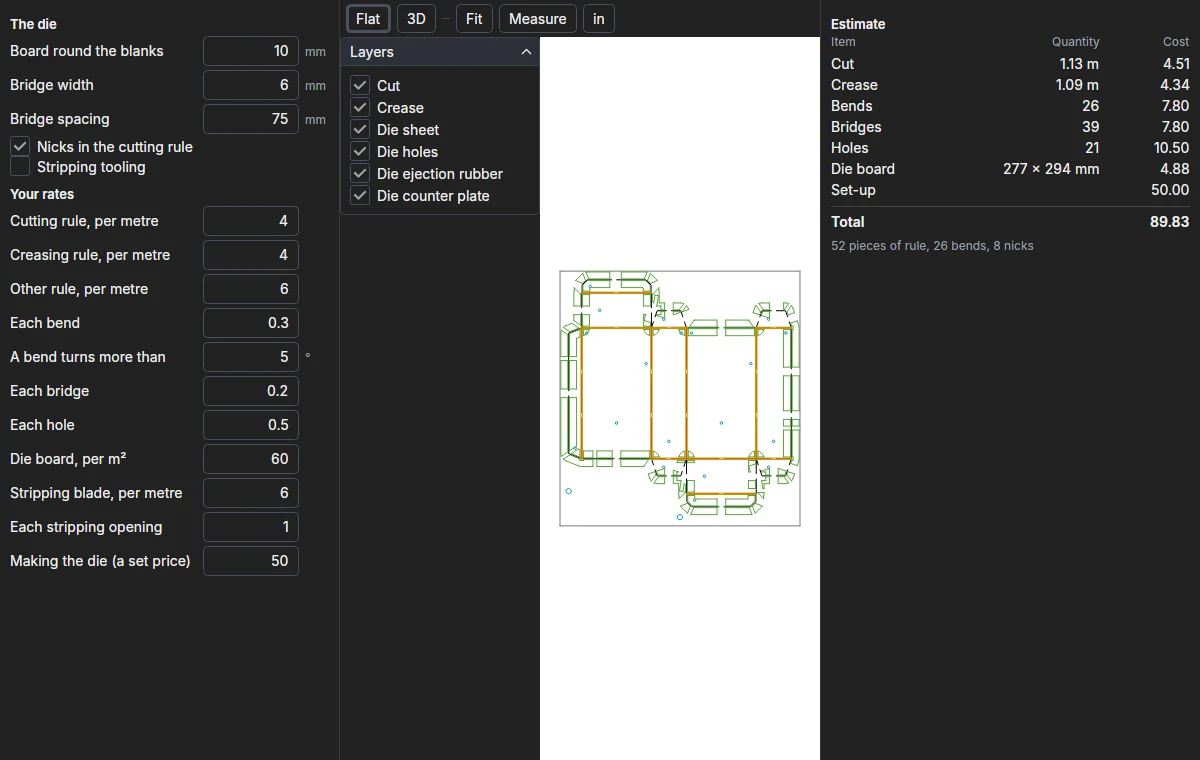
Click Open… and choose a dieline (or drop one on the window): its cut, crease and other rule lines give the die, which is drawn in the middle with each kind of line on its own layer. Under The die are the settings it is made with:
- Board round the blanks: the die board's margin.
- Bridge width and Bridge spacing: the uncut gaps that hold the board together.
- Nicks in the cutting rule: gaps ground in the rule to hold the blanks in the sheet.
- Stripping tooling: pins, knives and the lower board's openings for the waste.
Your rates
Under Your rates type what you charge: rule per metre (cutting, creasing and other), each bend, each bridge, each hole, the die board per m², stripping blade per metre, each stripping opening, and a set price for making the die. A bend is a turn of the rule sharper than A bend turns more than (an arc is a bend too). Your rates and settings are kept for next time.
The estimate
The estimate on the right is made again as you change a rate or setting:
| Line | Quantity |
|---|---|
| Each kind of rule | Its length |
| Bends | The bends in the rule |
| Bridges | The bridges |
| Holes | The holes, if any |
| Die board | The board's size |
| Stripping | The stripping blade, if any |
| Set-up | The set price |
Below the total are the pieces of rule (each cut from the coil and bent), the bends and the nicks.
Exporting
Export die… writes the die (its rules, bridges, nicks and holes) as a drawing, in the format chosen by the file type in the save dialog: PDF, DXF, CF2, DDES and the others. Save estimate… saves the estimate as a list (CSV) for a spreadsheet. Both need the licence.