Pipe Saddle Tool
Use the Pipe Saddle Tool to draw the cutting template for a branch pipe meeting a main pipe at an angle (a "fish mouth"): print it full size, wrap it round the branch, and mark along the curve. It is a tool of the pipework and HVAC trades.
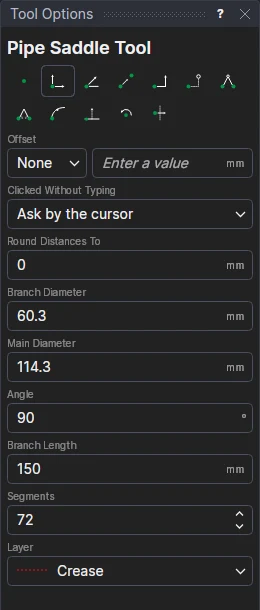
Usage
- Fill in the Branch Diameter and Main Diameter (outside diameters), the Angle between the two pipes' axes (90 for a branch square to the main) and the Branch Length (how far the template reaches along the branch, from where the branch's axis meets the main).
- Set the number of Segments the curve is drawn in (72 to start with).
- Choose the layer to cut on.
- Click* where the template starts.
- Click* a point along the way it runs. The curve is shown as you move.
The template is as long as the branch's circumference (π × its diameter). It has a side at each end, a top at the branch length, and three quarter lines on the Crease layer (if the drawing has one): line the start and the middle up with the main's axis, and the quarter lines across it.
The curve
Across the template, at each point round the branch (φ, from 0 at its start to 360° at its end), the curve is how far along the branch that line of it meets the main, from where the branch's axis meets it:
(√(R² − r² sin²φ) − r cos φ cos θ − R) / sin θ
for the branch's radius r (no bigger than the main's), the main's radius R and the angle θ. For a branch square to the main, the curve is highest (0) on the line along the main's crown, and lowest a quarter round.
It follows the drawing
The two diameters, the angle and the length are kept in new labelled variables (SADB1, SADM1, SADA1, SADL1), and the template is drawn by FOR blocks on the two points you marked: change a variable, or move a point, and the template follows.
*Depending on the chosen snap mode, several clicks may be required to define the point parametrically. Read more about Snap Modes
To print the template full size, marked for wrapping round the pipe (angles, centre lines, an overlap strip, its girth), use File › Export › Export… › Wrap-around templates (PDF): see Wrap-around templates.
In 3D
A 3D page shows the template rolled into the branch pipe it cuts, standing at its angle on the main pipe, the cut on the main pipe's surface all round (Wrapping and sweeping).