Fold Line Tool
Use the Fold Line Tool to draw where a piece folds - a wallet's middle, a strap turned over a buckle, a turned edge - and the band skived along it so it folds flat.
Usage
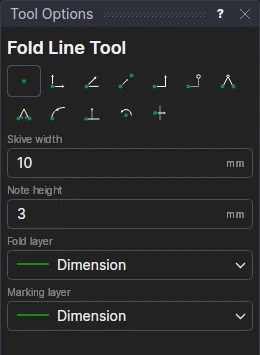
- Fill in the Skive width: the band skived along the fold, half each side of it (0 for none).
- Fill in the Note height, and choose the Fold layer (the Crease layer, by default) and the Marking layer for the band and the note (the Dimension layer).
- Click* one end of the fold, then the other.
The fold is a line between the two points; the band's edges and the FOLD note are a block on the points and the width's variable (FSKW1), so they follow the fold.
*Depending on the chosen snap mode, several clicks may be required to define the point parametrically. Read more about Snap Modes
See also: Skive Tool, Leather Goods.