Batch Converter
The ParametrIQ Batch Converter converts many drawing files at once to other formats, or for a machine with
ParametrIQ CAD's machine profiles. It can also watch a folder and convert each drawing put in it
as it arrives. Each file is read and written with ParametrIQ CAD's own readers and writers. It is a separate, free
program (PiQ.Converter.App).
Getting the Batch Converter
The Batch Converter is free: it needs a ParametrIQ account and its own licence, which costs nothing. Ask for it under ParametrIQ Batch Converter on your account's Licenses page, download and install it, and activate it when it first starts, as Free Apps describes.
Files
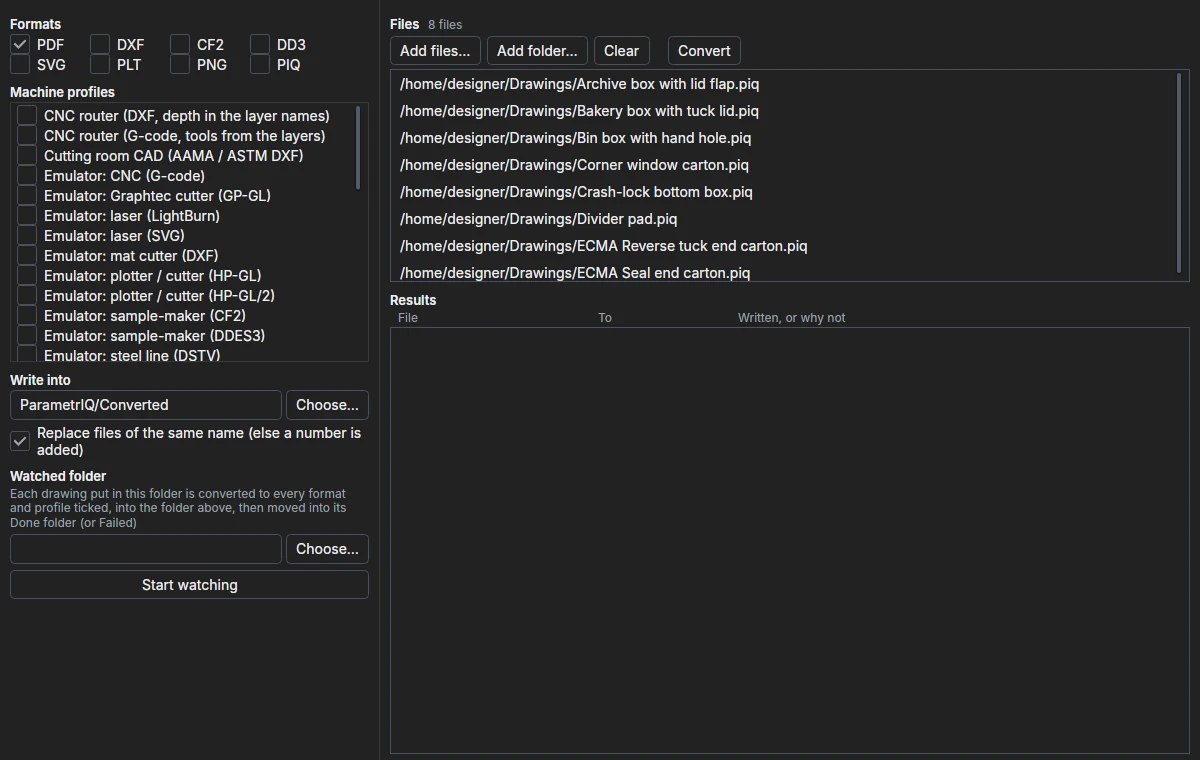
Add files… and Add folder… add the drawings to convert (a folder's sub-folders too), as does dropping files or folders on the window. Only files the converter reads are added: ParametrIQ drawings, CF2, DDES, DXF, HP-GL, G-code, PDF, SVG, EPS and Illustrator. Clear empties the list.
Formats and profiles
Tick what each file is converted to:
- Formats: PDF, DXF, CF2, DD3 (DDES), SVG, PLT (HP-GL), PNG and PIQ (a ParametrIQ drawing).
- Machine profiles: ParametrIQ CAD's machine profiles, and your own from CAD. A profile writes its format with the layers named, coloured and penned as the machine wants them, and names the file as the profile says.
Under Write into choose the folder the files are written into. With Replace files of the same name off, a number is added to a name already there.
Converting
Convert converts each file to every format and profile ticked, one file at a time; Cancel stops after the file it is on. Results lists, newest first, each file and what it was converted to, with the file written or, in red, why not. Converting needs the licence.
Watched folder
Choose a folder under Watched folder and click Start watching. Each drawing put in that folder (once it has stopped changing) is converted to every format and profile ticked, into the Write into folder, then moved into a Done folder beside it, or Failed if it couldn't be read. Its results are listed as they come. Stop watching stops. Watching needs the licence.