Dimension settings
What every dimension command (DIMHORIZONTAL, DIMVERTICAL, DIMALIGNED, DIMPERPENDICULAR, DIMRADIUS, DIMDIAMETER,
DIMORDINATE, DIMANGULAR), CALLOUT and MAGNIFIER can have after its layer, each as KEY=value after a comma.
Every setting but CAPTION has a system variable in the drawing that it takes when it isn't given. A dimension
without a setting of its own follows the variable, so changing the variable (in the Variables panel,
or typing #DFS=5) changes every such dimension at once. A setting given is the dimension's own.
Syntax
DIM… @id,points…,layer,KEY=value,KEY=value,…
| Key | Meaning | System variable | Default |
|---|---|---|---|
HEIGHT |
The text height (more than 0). | #DFS Dimension Font Size |
10 |
ARROW |
The arrow size (0 for none). | #DAS Dimension Arrow Size |
10 |
DIST |
How far out the dimension line is (DIMHORIZONTAL, DIMVERTICAL, DIMALIGNED). | #DD Dimension Distance |
10 |
GAP |
The gap between the extension lines and the points measured, and between the dimension line and its text. | #DGP Dimension Gap |
1 mm, 0.04" |
EXTEND |
How far the extension lines run past the dimension line. | #DEX Dimension Extension |
2 mm, 0.08" |
DECIMALS |
How many decimal places to show (0 to 10). | #DDP Dimension Decimal Places |
2 in mm, 3 in inches |
KIND |
"VECTOR" or "TRUETYPE". |
#DFK Dimension Font Kind |
"VECTOR" |
FONT |
An .shx file (empty for the built-in font), or a TrueType font's name or file. | #DFN Dimension Font Name |
"" |
BOLD, ITALIC |
TRUE for bold or italic text (TrueType). |
#DFB, #DFI Dimension Font Bold, Italic |
FALSE |
WIDTH |
How wide the letters are: 1 normal. | #DFW Dimension Font Width |
1 |
CAPTION |
Text to show instead of the measurement, in quotes. <> in it stands for the measurement: "<> max". |
HEIGHT, ARROW, DIST, GAP, EXTEND and WIDTH are expressions: a number, or anything worked out from the
drawing (HEIGHT=#DFS*2, DIST=FLAP/2).
Examples
DIMHORIZONTAL P0,P1,RIGHT,8,HEIGHT=12,DECIMALS=1
DIMVERTICAL P1,P2,RIGHT,8,CAPTION="Height <>",DIST=#DD*3
#DFS=8
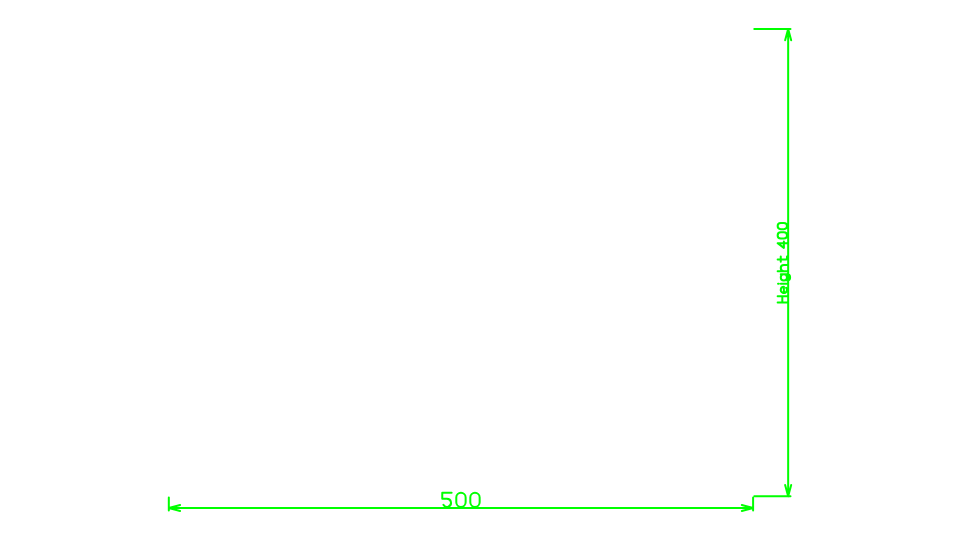
The last line makes every dimension without a height of its own 8 high.
Notes
Dimensions usually go on the Dimension layer (8 in a new drawing), which is not plotted. The settings are written after the dimension in the drawing file, and the Properties panel shows and changes them.