FILL
A fill: an area painted with hatch lines (parallel lines, crossed if asked), one colour or a gradient. The area is either the one the drawing closes off round a point (closed shapes inside it, islands, are left empty), or the area that given elements bound. Text in the area is filled round. The fill is one element, not elements of its own: it is worked out again whenever the drawing changes, so it follows its boundary.
Syntax
FILL point
FILL @id,point,layer,KEY=value,…
| Argument | Meaning |
|---|---|
| point | A point inside the area to fill. Hatch lines pass through it, so moving it shifts them; a gradient in drawing units is measured from it. |
The id, layer and any settings after it are the element settings. The fill's own settings:
| Setting | Meaning | Default |
|---|---|---|
| STYLE | "HATCH", "SOLID" (one colour) or "GRADIENT". |
"HATCH" |
| COLOR | A solid fill's colour, [red,green,blue] or [red,green,blue,opacity], each 0 to 255. |
the layer's colour |
| ELEMENTS | The elements whose closed loops bound the area, as a list ([@1,@2]), instead of the area round the point. |
|
| FILLRULE | With ELEMENTS: "EVENODD" (every other loop in is a hole) or "NONZERO" (loops running the same way as the one round them are filled). |
"EVENODD" |
| SPACING | Hatch: the distance between the lines. | 3 |
| HATCHANGLE | Hatch: the direction of the lines, in degrees from the X axis. | 45 |
| CROSSHATCH | Hatch: TRUE for a second set of lines. | FALSE |
| CROSSANGLE | Hatch: the angle between the two sets, in degrees. | 90 |
| SHIFT | Hatch: how far the lines are shifted across from the point. | 0 |
| AROUNDTEXT | FALSE to fill across text rather than round it. | TRUE |
| TEXTMARGIN | How far the fill is kept from text. | half the text's height |
| BOUNDARY | The layers whose elements bound a fill round its point, as a list ([0,1]). |
every layer |
A gradient's settings:
| Setting | Meaning | Default |
|---|---|---|
| GRADIENT | "LINEAR", "RADIAL", "CONIC" or "CORNERS". |
"LINEAR" |
| UNITS | "BOX": positions are fractions of the area's box, [0,0] its bottom left and [1,1] its top right, so the gradient stretches with the area. "DRAWING": drawing units from the fill's point. |
"BOX" |
| START, END | Linear: where the first and last colours are. | [0,0.5], [1,0.5] |
| CENTER, RADIUS | Radial: the outer circle (the last colour); conic: the centre. | [0.5,0.5], 0.5 |
| FOCUS, FOCUSRADIUS | Radial: the focal circle (the first colour), anywhere inside or outside the outer one. | the centre, 0 |
| CONICANGLE | Conic: where the first colour is, in degrees anticlockwise from the X axis. | 0 |
| STOPS | The colours along the gradient: an offset (0 to 1), then red, green, blue and opacity, for each: [0,255,255,255,255,1,0,0,0,255]. |
white to black |
| CORNERS | Corners: red, green, blue and opacity at the bottom left, bottom right, top right and top left, blended across. | |
| SPREAD | Beyond the ends: "PAD" (the end colours carry on), "REFLECT", "REPEAT" or "NONE" (nothing). |
"PAD" |
| TRANSFORM | A matrix [a,b,c,d,e,f] moving the gradient within its units: turned, skewed or scaled. |
none |
These are the gradients PDF, PostScript and SVG paint: linear (axial), radial with a focal circle, conic (sweep) and four-corner (a mesh), with their spread.
Examples
P0=[0,0]
P1=[200,0]
P2=[200,100]
P3=[0,100]
LINE @1,P0,P1
LINE @2,P1,P2
LINE @3,P2,P3
LINE @4,P3,P0
P4=P0+[50,50]
FILL @5,P4,0,SPACING=5,HATCHANGLE=45,CROSSHATCH=TRUE
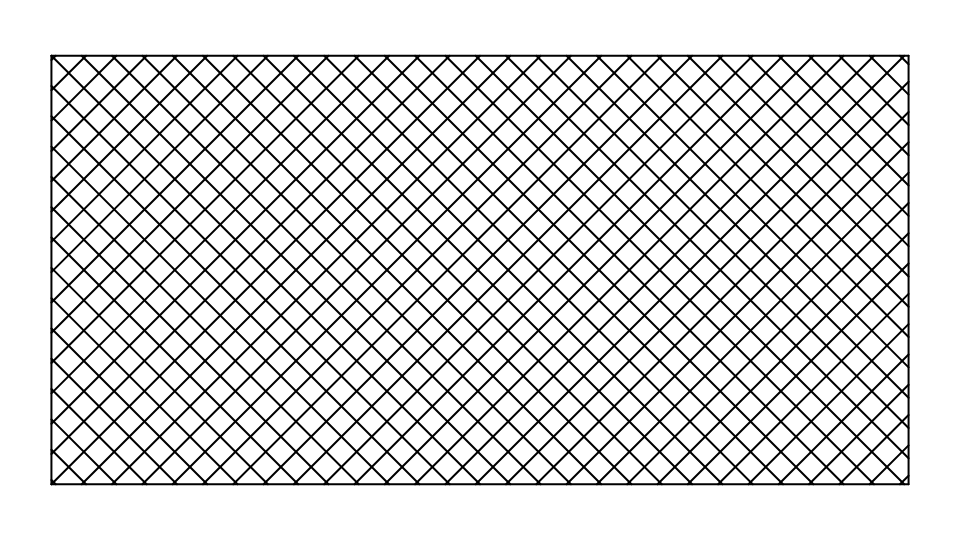
The rectangle is cross-hatched 5 apart. Move P2, and the hatch follows. In one colour, half seen through:
FILL @5,P4,0,STYLE="SOLID",COLOR=[230,60,40,128]
A radial gradient, white at a highlight up and to the left, blue at the edge:
FILL @5,P4,0,STYLE="GRADIENT",GRADIENT="RADIAL",CENTER=[0.5,0.5],RADIUS=0.6,FOCUS=[0.3,0.7],STOPS=[0,255,255,255,255,1,30,80,180,255]
A circle filled between its own outline and a square inside it (the square a hole):
FILL @9,P4,0,STYLE="SOLID",ELEMENTS=[@6,@7]
Notes
- Round a point, the area is the smallest one the elements close round it: lines, arcs, circles, curves and polylines (not text, dimensions, pictures, points or other fills).
- Only what is shown counts: hidden elements, elements on hidden layers and anything on the Construction layer neither bound a fill round a point nor are filled round. A fill bounded by ELEMENTS uses them even when they are hidden (imported fills are bounded by hidden outlines).
- If the point isn't closed in, or lies on an edge of the area, nothing is drawn until it is inside one.
- PDF, EPS, Illustrator, SVG and pictures paint fills as they are; DXF writes them as HATCHes (pattern, solid or gradient); machine formats (CF2, DDES3, G-code, HP-GL) write hatch lines only. See File Formats.