Callout Tool
Use the Callout Tool to add a note: text in a box, with a leader and an arrow to the thing it is about.
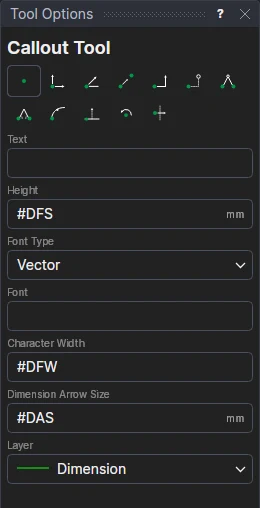
Usage
- Type the text in Text in Tool Options. Type
\nto start a new line. - Click* the point the callout is about. The arrow will point to it.
- Click* where the text starts: the left end of the text, half way up it. The callout is shown as you move the cursor, and is added on this click.
Its other options are the dimension tools': Height, Font Type, Font, Bold, Italic, Character
Width and Dimension Arrow Size, each starting as the drawing's
dimension setting variable (#DFS …), so a callout left so follows the variable
(see the Ortho Dimension Tool). The callout goes on the Dimension layer unless you
choose another. Its margin round the text is the dimension gap, #DGP (at least 0.4 of the text height).
Notes
- The leader runs to the middle of the side of the box that faces the point, and isn't drawn when the point is inside the box.
- Both points are drawing points, so the callout follows them. Select the text point and move it to move the box.
- Change the text, or its height and font, in the Properties panel.
- Callouts are written to DXF as lines and text, and to CF2 and DDES3 as their lines and texts.
*Depending on the chosen snap mode, several clicks may be required to define the point parametrically. Read more about Snap Modes
See also: CALLOUT.