Corners Tool
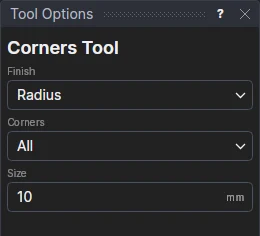
Use the Corners Tool to finish the corners of a panel of straight sides - a rectangle, a shaped glass panel, a worktop - all at once or one at a time: rounded to a radius, clipped (dubbed: cut off square across), or notched (a rectangle cut out of the corner, for a patch fitting or a wall's return).
Usage
- Draw the panel as a closed polyline of straight sides (the Rectangle Tool and the Line Segment Tool draw them).
- Choose the Finish: Radius, Clip (dubbed) or Notch.
- Fill in the Size: the radius; the clip, along each side from the corner; or the notch along the side before the corner, and its Notch across along the side after it.
- Choose the Corners: All, or Nearest the click.
- Click the outline (near the corner to finish, if only one).
The outline is kept on the Construction layer and the finished outline drawn in its place, a block on its points and the sizes' variables (CFR1, CFN1): move a corner, or change a size, and the finished outline follows. Inside (reflex) corners are rounded the right way too.
See also: Edge Allowance Tool, Fillet Tool, Chamfer Tool, Glass.