Curved Bend Tool
Use the Curved Bend Tool to bend a panel round along its length: the curved front of a display, the wall of a round or oval tube, a curved lid. The panel is either scored with a row of evenly spaced score lines across it (it then bends a little at each), or left smooth (formed round, with no creases). The bend is kept in the drawing as a CURVEDBEND, so the 3D page folds the panel as a curve, with the panels beyond it carried round on its end. It is a tool of the packaging trade (there is no Bend tool of its own: Bend Line is sheet metal's).
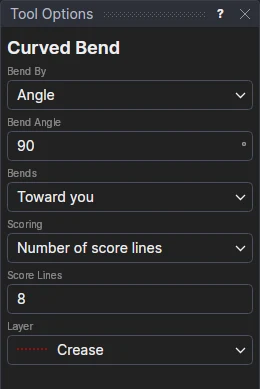
Usage
- Choose Bend By: Angle (how far the panel turns from one end of the bend to the other) or Radius (the radius it bends round, to the board's middle). Fill in the Bend Angle (degrees, up to 360) or the Bend Radius.
- Choose which way it Bends: Toward you (as a crease folds) or Away from you (as a reverse crease folds).
- Choose the Scoring: Smooth (no score lines), a Number of score lines (fill in Score Lines), or Score spacing (fill in Score Spacing: as many score lines as fit at about that spacing).
- Choose the Layer for the score lines: the Crease layer to start with (the Reverse crease layer when it bends away, if the drawing has one); a Partial cut layer for kiss-cut scores.
- Click the line the bend starts at: a crease or the panel's edge, across the panel.
- Click the line it ends at: the far edge or crease, parallel to the first. The score lines are shown as you move over it.
Only line segments are picked (not lines on the Construction layer). Click two more lines to bend another panel the same way.
What it draws
The bend runs from the first line to the second; its flat length L is the distance between them, and it bends round a radius of L over the angle (in radians), so the curve is exactly as long as the flat panel.
Score lines are spread evenly: with n of them, each is in the middle of its strip, the strips L/n wide and the first and last score half a strip from the bend's ends. Each folds the angle over n, so folded, the strips touch the bend's circle at their middles and the bend starts and ends square to the panels either side. Each score line runs the length of the first line clicked, on the layer chosen, and is cut, creased and exported like any line on it (Make Die, CF2, DXF, the plotters and cutters).
A smooth bend has no lines: it is shown on screen as a dotted cross on the bend, and never cut or exported. The 3D page folds it along lines of its own, one every 5° (at least 4, at most 72), with no crease grooves, all in one step.
It follows the drawing
The angle (CBA1), the radius (CBR1), the number of score lines (CBN1) and their spacing (CBS1) are kept in new
labelled variables, which the next bends share. The bend is defined on the first line's two end points
and the second line's start, so moving the panel's lines moves and resizes it. Bent by radius, its angle is worked out
from the panel's length (RTOD(DISTANCE(P5,FOOT(@9,P5))/CBR1)), so a longer panel bends further round the same
radius; scored by spacing, the number of scores is too (MAX(1,ROUND(DISTANCE(P5,FOOT(@9,P5))/CBS1))).
Worked example
A display's header curves forward over 120 mm. Draw the header panel with a crease along its bottom (the fold to the back panel) and its top edge. With Bend By Angle 60, Toward you, Number of score lines 12, click the bottom crease, then the top edge: twelve scores 10 mm apart go across the header, each folding 5°, and the 3D page shows it curving forward round a radius of about 115 mm. Change CBA1 to 90 and it curves further; change the scoring to smooth (edit the CURVEDBEND's scores to 0) for a header that is formed round with no scores.
See also: CURVEDBEND, Crease Offset, Bend Line, Pages, Packaging.