Foam Layers Tool
Use the Foam Layers Tool to set out a foam insert built up from sheets: a top sheet the pockets go through, a middle one, a solid base … Each sheet's outline is drawn side by side, named, ready to cut, and the Pocket Tool then cuts each pocket through every sheet its depth reaches.
Usage
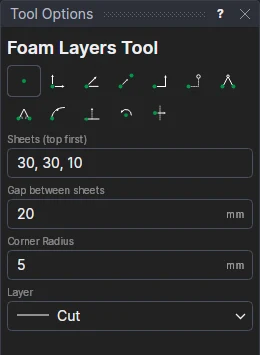
- Type the Sheets (top first): each sheet's thickness, separated by commas:
30, 30, 10. - Fill in the Gap between sheets (how far apart they are laid out) and the insert's Corner radius.
- Choose the Layer to cut them on.
- Click* one corner of the insert, then the opposite corner.
The first sheet (the top) is on the corners you click; the next is one step along (the insert's width and the gap), and so on. Each is named with its thickness (Top: 30, Layer 2: 30, Base: 10) on the Dimension layer.
The thicknesses are kept as a list in a variable (FOAMT1 =
{30,30,10}), with the gap (FOAMG1), the corner radius (FOAMR1) and the step between sheets (FOAMX1). Add a
sheet to the list, or change a thickness, and the stack follows - and so do the pockets cut through it.
*Depending on the chosen snap mode, several clicks may be required to define the point parametrically. Read more about Snap Modes
See also: Pocket Tool, Foam and Inserts.