Ordinate Dimension Tool
Use the Ordinate Dimension Tool to dimension how far a point is across (X) or up (Y) from an origin, as a single number at the end of a leader. A row of ordinate dimensions from the same origin dimensions a part without dimension lines crossing it. The dimension follows its points when they move.
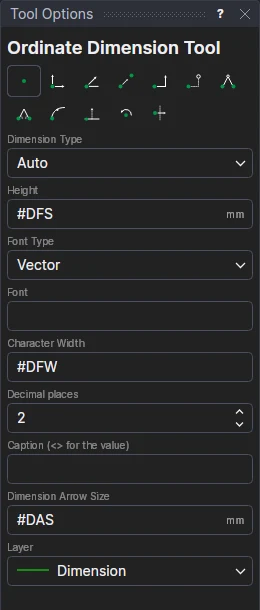
Usage
- Choose the dimension type:
- Auto: chosen by where you place the text. Above or below the point measures across (X); to its left or right measures up (Y).
- X or Y: always that one.
- Set the dimension's options if you need to. Each starts as the drawing's
dimension setting variable: a dimension made with an option left so keeps to the
variable, and changes when it does; change an option here for the dimension to have its own.
- Height: the height of the capital letters, an expression:
#DFS(Dimension Font Size) to begin with. - Dimension Arrow Size: an expression:
#DASto begin with (0 for no arrows). - Font Type and Font: a vector font (an .shx file, or empty for the built-in font) or a TrueType font
(an installed family, or a .ttf or .otf file),
#DFKand#DFNto begin with. TrueType fonts can also be Bold and Italic (#DFB,#DFI). - Character Width: how wide the letters are, an expression:
#DFW(1, normal) to begin with. - Decimal places: the most shown (
#DDP: 2 in millimetres, 3 in inches). Trailing zeros are left off. - Caption (<> for the value): text instead of the measurement, with
<>standing for it (for example<> TYP). Leave it empty to show the measurement. It has no variable.
- Height: the height of the capital letters, an expression:
- Choose the layer to draw the dimension on. It starts as the Dimension layer, if the drawing has one.
- Click* the origin to measure from, such as a corner of the part.
- Click* the point to measure.
- Click* where the text goes. The dimension is shown as you move.
The leader runs straight up or down from the point (X), or straight across (Y), to level with the text. If the text isn't in line with the point, the leader jogs half way to reach it. The value is written along the leader, past its end: upright for X, level for Y. It is negative to the left of the origin (X) or below it (Y).
Ordinate dimensions are read from and written to DXF files as DXF ordinate dimensions.
*Depending on the chosen snap mode, several clicks may be required to define the point parametrically. Read more about Snap Modes