Piece Label Tool
Use the Piece Label Tool to label a pattern piece: its name, how many to cut and the material, written beside a grain or stretch arrow, as leather, upholstery and sewing patterns have them.
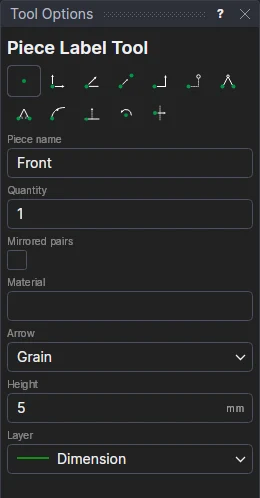
Usage
- Type the Piece name and the Quantity to cut. Tick Mirrored pairs for pieces cut in pairs, one of each turned over (a left and a right): the label says Cut 2 pairs (mirrored).
- Type the Material, if you like.
- Choose the Arrow:
- Grain: the direction the piece is cut along (the hide's backbone, the fabric's grain): heads at both ends.
- Stretch: the way the piece may stretch: a head at the second point.
- None: just the label.
- Fill in the text's Height (the arrowheads are as long), and choose the Layer.
- Click* the arrow's start, then its end; with no arrow, click where the label goes.
The arrow is a grain line; the text a block on its points, so it moves with the arrow. The quantity and the height are variables (PLQ1, PLH1): change PLQ1 and the label says the new quantity.
*Depending on the chosen snap mode, several clicks may be required to define the point parametrically. Read more about Snap Modes
See also: Grain Line Tool, Leather Goods.