Polygon Tool
Use the Polygon Tool to draw a regular polygon (all sides and angles equal) as a closed polyline.
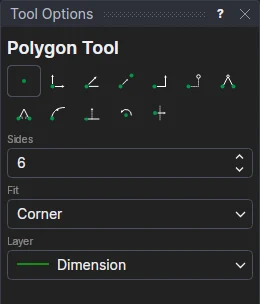
Usage
- Set the number of Sides, from 3.
- Choose the Fit: Corner if the second point you mark is a corner; Middle of a side if it is the middle of a side.
- Choose the layer to draw on.
- Click* the centre.
- Click* a corner (or the middle of a side). The polygon is shown as you move.
The other corners are new points worked out from the centre and the point you marked
(POLAR(P1,RTOD(ANGLE(P2-P1))+60,DISTANCE(P1,P2)) …), so the polygon turns and grows with them and nothing is fixed
in space.
*Depending on the chosen snap mode, several clicks may be required to define the point parametrically. Read more about Snap Modes