Stair Tool
Use the Stair Tool to draw a stair carpet template: a runner up a whole flight, its folds marked, or a piece for each step (its riser, the wrap round its nosing and its tread).
Usage
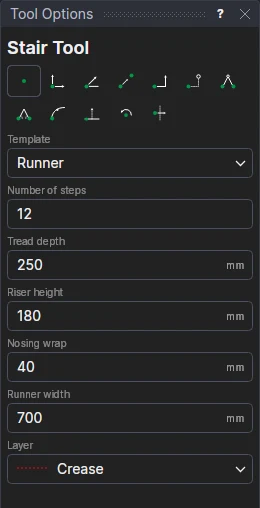
- Choose the Template: Runner, or Tread and riser pieces.
- Fill in the Number of steps, the Tread depth, the Riser height, the Nosing wrap (what wraps round each step's nosing, between its riser and its tread) and the Runner width.
- Mark the template's bottom left corner.
The template is cut on layer 0. On a runner, the folds - at the foot of each riser, the top of each riser and the end of each nosing's wrap - are marked on the Crease layer; each step is numbered from the bottom. Pieces are drawn one above another, a gap apart.
A template that follows its sizes
The template is a block on variables: STEPN1, TREAD1, RISER1, NOSE1 and RUNW1. Change the number of steps or any size, and it is drawn again.
The library's Stair tread templates design (in Run Parametric's Carpets and flooring folder) also makes the bottom step's piece for a bullnose step.
See also: Rug Border Tool, Carpets and flooring.