Window with Patch Tool
Use the Window with Patch Tool to cut a window in a carton and draw the film patch glued over it: the window, its corners rounded, cut; and the patch's outline, the overlap bigger all round, for the window-patching machine. It is a tool of the packaging trade.
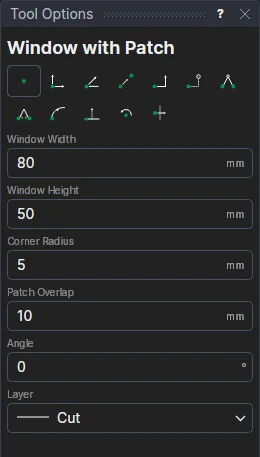
Usage
- Fill in the Window Width and Window Height, the window's Corner Radius, and the Patch Overlap (how far the film reaches beyond the window all round: its glued margin, 8 to 12 mm is usual).
- Fill in the Angle the window is turned by (degrees anticlockwise; 0 has its width along X).
- Choose the layer to cut the window on (the Cut layer, to start with).
- Click* the window's centre. The window and the patch are shown as you move.
The patch's outline goes on the Window film layer, added if the drawing hasn't one: it is shown but not plotted or cut. Its corners are rounded by the window's radius plus the overlap.
It follows the drawing
The sizes are kept in new labelled variables (WPW1, WPH1, WPR1, WPO1, WPA1), and the window and patch are drawn by a block on the centre you marked: move it, or change a variable, and both follow.
*Depending on the chosen snap mode, several clicks may be required to define the point parametrically. Read more about Snap Modes
See also: Packaging.