BARCODE
A barcode or QR code on four corner points: EAN-13, EAN-8, UPC-A, UPC-E, ITF-14, Code 128, GS1-128, QR code, Data Matrix, GS1 DataMatrix or PDF417.
Syntax
BARCODE p1,p2,p3,p4,kind,data
BARCODE @id,p1,p2,p3,p4,kind,data,layer,SETTING=value,…
| Argument | Meaning |
|---|---|
| p1 … p4 | The corners: bottom left, bottom right, top right, top left. |
| kind | EAN13, EAN8, UPCA, UPCE, ITF14, CODE128, GS1128, QR, DATAMATRIX, GS1DATAMATRIX or PDF417. |
| data | What the code holds: text in quotes, or an expression of the drawing's variables, such as GTIN or CONCAT("https://example.com/",CODE). The code is made again whenever the variables change. |
The id, layer and any settings after it are the element settings.
Settings
Write a setting only to change it from its default.
| Setting | Meaning |
|---|---|
QUIET=FALSE |
Leave out the quiet zone (the light margin a scanner needs). By default it is inside the box. |
READABLE=FALSE |
Leave out the digits or text printed under a linear code. |
ECC="L" |
A QR code's error correction: "L" (7%), "M" (15%, the default), "Q" (25%) or "H" (30%). |
COLOR=[r,g,b] |
The colour of the bars and text, each 0 to 255. By default they are in the layer's colour. |
BEARERS=FALSE |
Leave out the bearer bars round an ITF-14 code. |
The data
| Kind | Data |
|---|---|
| EAN-13, EAN-8, UPC-A, ITF-14 | Digits only: 12, 7, 11 or 13 of them. Leave off the check digit and it is worked out; give it and it is checked. |
| UPC-E | The number system (0 or 1) and six digits, with or without the check digit. |
| Code 128 | Any ASCII text. |
| GS1-128, GS1 DataMatrix | Application identifiers in brackets, each followed by its value: (01)09501101530003(17)261231(10)AB12. A GTIN (01, 02) or SSCC (00) has its check digit worked out if you leave it off. |
| QR code, Data Matrix, PDF417 | Any text, such as a web address. |
Write digits in quotes ("0360002914"), so a leading zero is kept. Data that can't be encoded is refused with a
message saying why, such as a wrong check digit. When the data comes from variables, the code is crossed through
while they give something it can't encode.
Examples
BARCODE P0,P1,P2,P3,EAN13,"400638133393"
GTIN = "590123412345"
BARCODE P0,P1,P2,P3,EAN13,GTIN,0,READABLE=FALSE
BARCODE P0,P1,P2,P3,QR,CONCAT("https://example.com/p/",GTIN),0,ECC="H",COLOR=[0,0,0]
BARCODE P0,P1,P2,P3,ITF14,"1540014128876"
BARCODE P0,P1,P2,P3,GS1128,"(01)09501101530003(10)AB12"
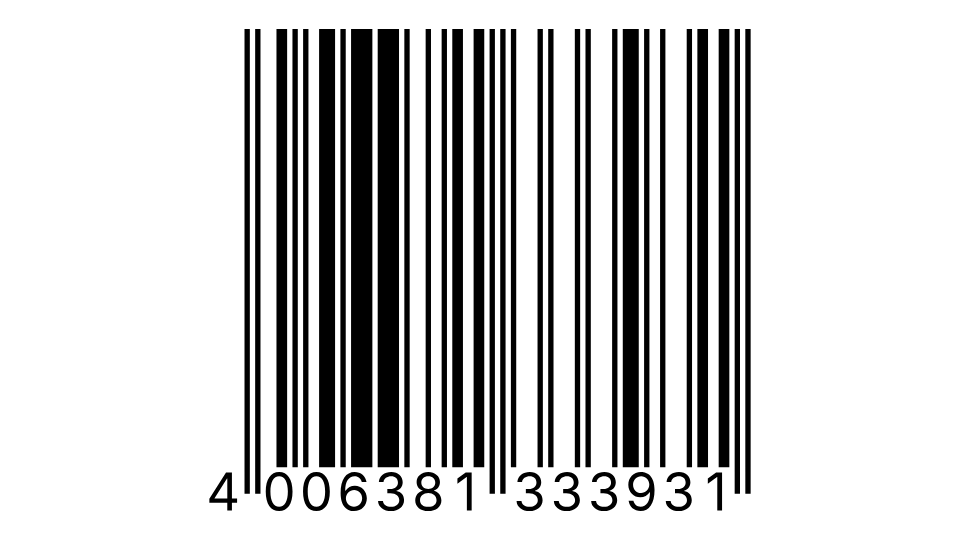
An EAN-13 with its check digit worked out, one from a variable, a QR code holding a web address made from it, an ITF-14 for a shipping case and a GS1-128 with a lot number.
Notes
You will rarely type this: place codes with the Barcode Tool, and this is how they are written in the drawing file.
A linear code fills its box: the bars are as tall as the box and the modules as wide as its width allows, so the text is never stretched. A QR code, Data Matrix or PDF417 is fitted to the corners. Move, turn, scale or mirror the corners and the code follows them.
Barcodes are artwork. They are drawn and exported as filled shapes (PDF, EPS, Illustrator, SVG and DXF), never as pictures, and are not cut or plotted. Print them at a size and contrast your printer and the GS1 rules allow, and check them with a scanner before production.
See also: RASTERIMAGE, VECTORIMAGE.