BRAILLE
Braille on a pack or sign, in a box on four corner points: the text translated to uncontracted braille, its dots the sizes of Marburg Medium (medicines) or the ADA Standards (signs).
Syntax
BRAILLE p1,p2,p3,p4,text
BRAILLE @id,p1,p2,p3,p4,text,layer,SETTING=value,…
| Argument | Meaning |
|---|---|
| p1 … p4 | The box's corners: bottom left, bottom right, top right, top left. The braille starts at the top left corner and runs along the top. |
| text | What it says: text in quotes, braille itself (Unicode braille, "⠏⠜⠁⠉⠑⠞⠁⠍⠕⠇"), or an expression of the drawing's variables, such as CONCAT(NAME," ",STRENGTH). The braille is made again whenever the variables change. |
The id, layer and any settings after it are the element settings.
Settings
Write a setting only to change it from its default.
| Setting | Meaning |
|---|---|
STANDARD="ADA" |
The sizes: "MARBURG" (Marburg Medium, the default) or "ADA". |
CAPITALS=FALSE |
Leave capital letters unmarked. By default each has dot 6 before it, and a word in capitals two. |
COLOR=[r,g,b] |
The colour the dots are drawn in, each 0 to 255. By default they are in the layer's colour. |
The sizes
| Standard | Dot | Dots in a cell | Cell to cell | Line to line |
|---|---|---|---|---|
| Marburg Medium (EN ISO 17351, medicines) | 1.5 mm | 2.5 mm | 6.0 mm | 10.0 mm |
| ADA Standards 703.3 (signs) | 0.06 in | 0.095 in | 0.27 in | 0.4 in |
Spacings are centre to centre. The sizes don't change with the box: a larger box holds more cells and lines, never larger dots. A line is broken between words; a word longer than a line is broken where it reaches the end.
The text
Letters are written in uncontracted (grade 1) braille: a to z, numbers after the number sign (a decimal point or
comma between digits keeps the number going, and a letter a to j right after a number gets the grade 1 indicator),
capitals, and the usual punctuation (. , ; : ! ? ' - / ( ) " & + = % * @ × ° µ). Accented letters and each country's
contractions differ from one language to another: give braille already translated for the pack's country as Unicode
braille, and it is kept as it is. Text it can't write is refused with a message naming the character. Braille that
doesn't fit its box is crossed through, and the message says how many lines it needs.
Examples
P10=[0,0]
P11=[80,0]
P12=[80,30]
P13=[0,30]
BRAILLE P10,P11,P12,P13,"Paracetamol 500 mg"
NAME = "Ibuprofen"
BRAILLE P10,P11,P12,P13,CONCAT(NAME," 200 mg"),0,CAPITALS=FALSE
BRAILLE P10,P11,P12,P13,"Exit",0,STANDARD="ADA"
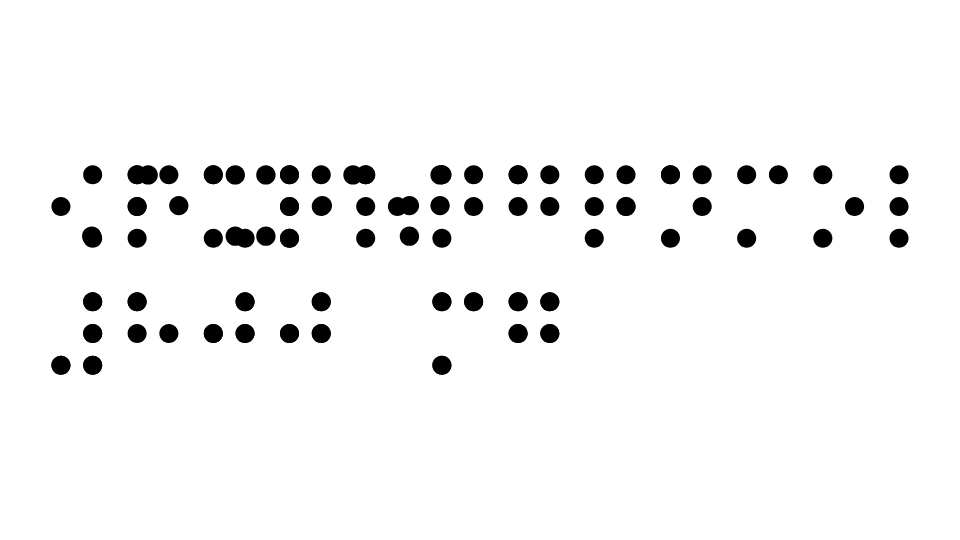
A medicine's name and strength in Marburg Medium, one from a variable with capitals unmarked, and a sign's word in ADA sizes.
Notes
You will rarely type this: place braille with the Braille Tool, and this is how it is written in the drawing file.
Braille is drawn and exported as filled dots (PDF, EPS, Illustrator, SVG and DXF), for the embossing die and the artwork; it is not cut or plotted. Check Dieline warns of braille across or near a fold or the board's edge, on a glued area or over a window. Have the embossing proofed: the dot height (about 0.2 mm for Marburg Medium) depends on the board and the die.