Sample Projects
A sample project is a finished example drawing for an industry: a design from the library with sensible values, made ready as a real job would be. Open one to see how a drawing of your trade comes together, to try the tools and the guided tour on it, or to start your own from it.
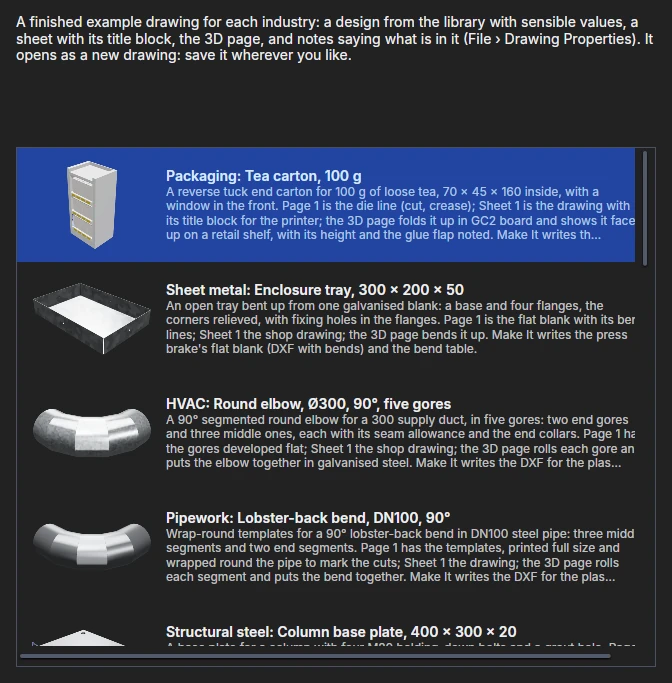
Opening a sample
- Help › Sample Projects… lists the samples, each with its picture and what is in it, your industry's chosen. Choose one and press Open (or double-click it).
- On the start page, Open a sample project in the Learn row opens your industry's sample (with no industry chosen, the list).
A sample opens as a new drawing, named by its title and not yet saved: the file that comes with ParametrIQ is never changed. Save it wherever you like.
What is in a sample
Each sample has:
- Page 1: the design itself, parametric as the library makes it. Change its variables in the Variables panel and every other page follows.
- Sheet 1: a sheet with the ISO A3 border round Page 1, its title block filled in from the drawing's notes.
- 3D: a 3D page showing Page 1 made 3D: folded, extruded, wrapped or put together, in the trade's materials, with a scene (a shelf, a wall) and dimensions in 3D where the trade uses them.
- Notes (File › Drawing Properties): its title, drawing number, revision, material and customer, which the title block shows, and About this sample, which says what is on each page.
Each sample passes File › Check Design with no errors, and Make It writes its industry's files from it.
The samples
| Industry | Sample | What it shows |
|---|---|---|
| Packaging | Tea carton, 100 g | A reverse tuck end carton with a window, folded in GC2 board on a retail shelf; its height and glue flap noted in 3D. |
| Sheet metal | Enclosure tray, 300 × 200 × 50 | A galvanised tray bent up from one blank, with fixing holes; the bend table. |
| HVAC | Round elbow, Ø300, 90°, five gores | The gores developed flat, rolled and put together in 3D; the duct fitting schedule. |
| Pipework | Lobster-back bend, DN100, 90° | Wrap-round templates for the segments, rolled into the bend in 3D. |
| Structural steel | Column base plate, 400 × 300 × 20 | The plate with its holding-down bolt holes, its sizes on the 3D model; the cutting list. |
| Gaskets | Flange gasket, DN50 PN16 | A full-face gasket in compressed fibre, 3 mm thick in 3D. |
| Laser cutting | Finger-jointed box, 200 × 150 × 80 | Six panels in birch plywood, put together by their mates in 3D. |
| Carpentry | Bookcase, 800 × 280 × 1800 | Seven shelves in housings, a plinth and a back, built from the parts in 3D; the panel cut list. |
| Sewing | Drawstring bag, 250 × 300 | The pattern pieces in cotton canvas, with seam allowances and notches. |
| Sign making | House plaque, No. 12 | An acrylic plaque with a routed border and capped screw holes, shown on a wall. |
| Picture framing | Window mount, 400 × 500 | A mount with a weighted bottom margin, shown on a wall; the moulding order list. |
| Vinyl cutting | Van door panel | A door panel with the handle recess and the safe area for the lettering. |
| Carpets | L-shaped living room | A cut plan from a 4 m roll, with the seam and drops, shown as the room; the roll cut list. |
| Labels | Jam jar labels | A wrap-round label kiss-cut on its liner, wrapped round the jar in 3D. |
| Leather goods | Card wallet | The pieces with their stitch lines, set out for 3.85 mm irons. |
| Foam | Tool case insert | Six pockets with finger pulls: a top sheet stacked on its base in 3D, its depth noted. |
| Glass | Shower screen, 900 × 2000 | 8 mm toughened glass with its clamp and bar holes, its sizes on the 3D model; the glass order list. |
| Stone and tile | L-shaped kitchen worktop | A quartz worktop with sink, hob and tap cut-outs and drainer grooves, on its base cabinets in 3D. |
Your own samples
The samples are the files in the Samples folder of the Extensions folders, one for each industry, named by the
industry (Packaging.piq, SheetMetal.piq …). To give your team its own, put a drawing of that name in the Samples
folder of your Extensions folder (File › Extensions › Open Extensions Folder): it is opened in place of the one that
comes with the app. Its Title and About this sample notes are what the list shows.
See also: Guided Tour, Run Parametric, Drawing sheets and borders, Making drawings 3D, Make It.