Braille Tool
Use the Braille Tool to place braille on a pack or sign: a medicine's name and strength on a carton in Marburg Medium, or a room's name on a sign at ADA sizes. It sits in a box pinned to four corner points, so it moves and turns when they move; its dots stay the standard's size whatever the box, and the box holds as many lines as fit.
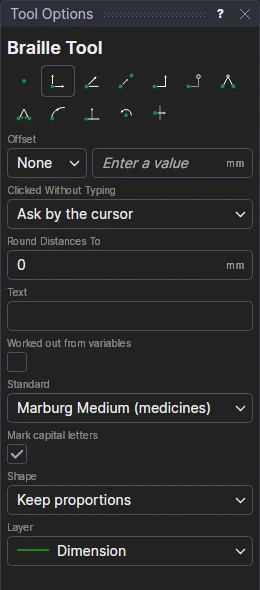
Usage
- Type the Text as it reads, such as
Paracetamol 500 mg. It is translated to uncontracted braille. For a language with accented letters or its own contractions, type (or paste) the braille itself, as Unicode braille translated for the pack's country. The status bar says which character can't be written. - To take the text from the drawing's variables, tick Worked out from variables and type an expression, such as
CONCAT(NAME," ",STRENGTH). The braille is made again whenever the variables change. - Choose the Standard: Marburg Medium for medicines (EN ISO 17351), or ADA for signs.
- Untick Mark capital letters if the country's braille leaves them unmarked.
- Choose its shape, as for a raster image:
- Keep proportions: click* the bottom left corner, then the bottom right corner. The box is as high as one line of the braille. The bottom edge can be at any angle.
- Rectangle: click* the bottom left and bottom right corners, then a point level with the top: room for several lines.
- Free: click* each corner in turn.
- Choose the layer to put it on (a layer of its own makes the embossing die's artwork easy to pick out).
The braille is shown as you place it. Braille that doesn't fit its box is crossed through. To change it afterwards, select it: the Properties panel shows its text, standard, capitals and colour, and how it reads.
Braille is exported to PDF, EPS, Illustrator, SVG and DXF as filled dots, and is never cut or plotted. Check Dieline warns of braille across or near a fold or the board's edge, on a glued area or over a window.
*Depending on the chosen snap mode, several clicks may be required to define the point parametrically. Read more about Snap Modes
See also: BRAILLE, Barcode Tool.