Buttonhole Tool
Use the Buttonhole Tool to mark buttonholes, or where the buttons go, along a line: down a placket, across a waistband, along a cushion cover's flap.
Usage
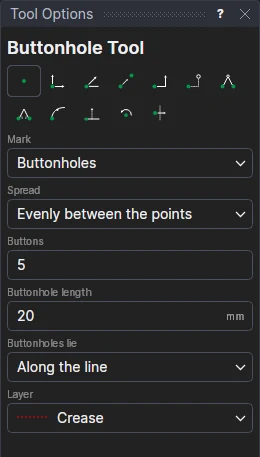
- Choose what to Mark: Buttonholes, or Buttons (a cross where each is sewn).
- Choose how they Spread: Evenly Between The Points (the first at the first point, the last at the second), or A Spacing Apart from the first point (then fill in the Button Spacing).
- Fill in the number of Buttons and the Buttonhole Length (a little more than a button across; a button's cross is half as big).
- Choose which way the Buttonholes Lie: Along The Line (a placket's) or Across The Line.
- Choose the layer to draw on.
- Mark* where the first goes, then where the last goes (with a spacing: which way they go).
A buttonhole is drawn as its slit with a short bar across each end.
Marks that follow the drawing
The marks are a FOR block on the two points and on new variables: the count (BHN1), the spacing (BHS1) and the length (BHL1). Move a point, or change the count, and they are spread again. Mark the buttonholes on the front and the buttons on the other front with the same points and variables, and they match.
*Depending on the chosen snap mode, several clicks may be required to define the point parametrically. Read more about Snap Modes