Corner Relief Tool
Use the Corner Relief Tool to cut a relief where two bends meet in a sheet-metal flat pattern, so the two flanges can be folded without tearing or bulging the corner. It is a tool of the sheet metal and HVAC trades.
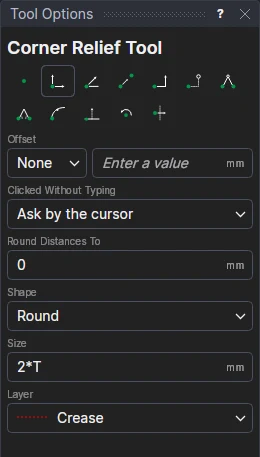
Usage
- Choose the Shape:
- Round: a round hole on the corner, the Size across.
- Square: a square on the corner, the Size a side, its sides along the bends.
- Tear-drop: a round hole on the corner, the Size across, drawn out to a point a Size from the corner, away from between the bends (towards the flat's corner notch).
- Fill in the Size. In a sheet-metal drawing it starts as
2*T, twice the sheet's thickness. - Choose the layer to cut on.
- Click* the corner: the point where the two bend lines meet (snap to their ends, or to where they cross).
- For a square or tear-drop relief, the tool lines it up with the two lines that end at the corner (the bend lines, on the Crease layer, if more lines end there). If there aren't two, click* a point along the first bend, then a point along the second.
It follows the drawing
The size is kept in a new labelled variable (RELIEF1 …): typed as 2*T, it follows the sheet's
thickness. The relief's points are worked out from the corner and the bends' points, so it moves and turns with them.
Nothing is fixed in space.
*Depending on the chosen snap mode, several clicks may be required to define the point parametrically. Read more about Snap Modes