Cut-Out Tool
Use the Cut-Out Tool to cut a sink, hob or socket cut-out (a rectangle with rounded corners), or a tap hole (a circle), measured as a fitter measures it: back from an edge, and along it from its end.
Usage
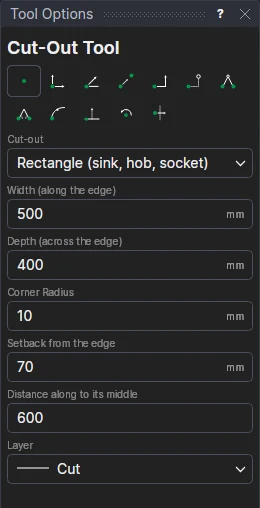
- Choose the Cut-out: Rectangle (sink, hob, socket) or Circle (tap hole).
- Fill in its Width (along the edge) (a circle's diameter), its Depth (across the edge) and Corner radius.
- Fill in the Setback from the edge (to the cut-out's near side) and the Distance along to its middle (from the edge's start).
- Click* the start of the edge it is measured from (a worktop's front edge, a splashback's bottom edge), a point along the edge, and a point on the side the cut-out goes. The cut-out is shown as you place the last point.
Every size is a variable (COW1, COD1, COR1, COF1, COX1) and the cut-out a block on them and the three points: move the edge, or change a size, and the cut-out follows.
*Depending on the chosen snap mode, several clicks may be required to define the point parametrically. Read more about Snap Modes
See also: Fitting Notch Tool, Stone and Tile.