Dovetail Tool
Use the Dovetail Tool to cut dovetails along a board's end: the tails, wide at the end and narrowing to the baseline a board's thickness in, or, for the other board, the pins (the sockets the tails go into). Use it for a marking template, or to cut a dovetailed box from sheet.
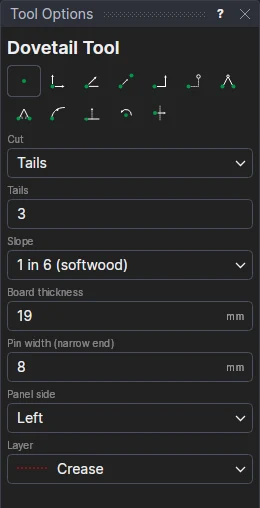
Usage
- Choose what to Cut: Tails or Pins.
- Fill in the number of Tails.
- Choose the Slope: 1 in 6 for softwood, 1 in 7, or 1 in 8 for hardwood.
- Fill in the Board Thickness (how deep the tails and sockets go: the other board's thickness) and the Pin Width (a pin's narrow end; the half pins at the sides are as wide).
- Choose the Panel Side: which side of the end, going from its first corner to its second, the board is.
- Choose the layer to draw on.
- Mark* one corner of the board's end, then the other. The tails are shown as you move.
The tails are spaced evenly between a half pin at each side. Draw the tails on one board and the pins on the other, with the same settings, and they fit. A straight line already drawn between the corners is moved to the Construction layer: the dovetails take its place.
Dovetails that follow the drawing
The dovetails are a FOR block on the two corners and on new variables: the count (DVN1), the slope (DVR1: 6 for 1 in 6), the thickness (DVT1) and the pin width (DVP1). Move a corner, or change a variable, and the dovetails are spaced again. The thickness and pin width boxes then show the variables, so the next board shares them.
See also the Dovetail template design in Run Parametric's Carpentry folder.
*Depending on the chosen snap mode, several clicks may be required to define the point parametrically. Read more about Snap Modes