Dust Flap Tool
Use the Dust Flap Tool to add a dust flap on the end of a carton's side panel: the edge becomes the flap's fold, and its sides lean in to a narrower far edge. It is a tool of the packaging trade.
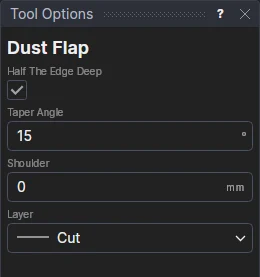
Usage
- Leave Half The Edge Deep ticked for a flap as deep as half the edge is long, so the two dust flaps of an end meet in the middle (it follows the edge); or untick it and fill in the Dust Flap Depth.
- Fill in the Taper Angle: how far the sides lean in from square, in degrees (15 to 20 is usual).
- Fill in the Shoulder: how far the sides run out square before they lean in (a lock shoulder, for a tuck's lock slit to catch on). 0 leans them from the fold.
- Choose the layer to cut on (the Cut layer, to start with).
- Click the edge, on the side the flap goes. It must be a straight line (a line segment).
What it draws
The edge is kept on the Construction layer, and in its place the fold is drawn on the Crease layer (if the drawing has one), and the flap's outline on the layer chosen. If the sides would cross, they lean in only as far as fits.
It follows the drawing
The angle and shoulder (and a depth typed) are kept in new labelled variables (DFA1, DFS1, DFD1); the flap is drawn by a block on the edge's two ends, so it follows them and the variables.