Ellipse Tool
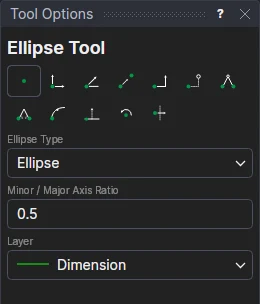
Use the Ellipse Tool to draw an ellipse, or part of one (an elliptical arc), from its centre or through three points.
Usage
- Choose the Ellipse Type: Ellipse for a whole one, Elliptical arc for part of one from its centre, or Three-point arc for part of one through three points (see below).
- Set the Minor / Major Axis Ratio: 0.5 makes it half as wide as it is long; 1 makes a circle. It can be a number or any expression, and is kept in a new variable (RATIO1 …), so you can change it later.
- For an arc, tick Anticlockwise (or clear it for clockwise).
- Choose the layer to draw on.
- Click* the centre.
- Click* the end of the major (long) axis. A whole ellipse is drawn now.
- For an arc, click where it starts round the ellipse, then where it ends. A dotted line from the centre follows the cursor round the ellipse to show where. These clicks only say where round it: they don't make points of their own.
The end of the minor axis is a new point at right angles to the major axis, worked out from the two points you marked and the ratio, so the ellipse turns and grows with them and nothing is fixed in space.
An arc's two ends are made new points too, ONELEMENT(@5,0) at its start and ONELEMENT(@5,1) at its end (see
ONELEMENT), so other tools can snap to them, draw from them or join to them, and they
follow the arc when it changes.
Three-point arcs
With Three-point arc chosen:
- Click* the point it starts at.
- Click* a point it passes through.
- Click* the point it ends at. The arc is shown as you move.
One axis of its ellipse lies along the line from the start to the end, and the other is the Minor / Major Axis Ratio times it (kept in a new variable, RATIO1 …). Its centre, size and which way round it goes are worked out from the three points whenever they move, so it always passes through all three, and its ends are the points you clicked. A ratio of 1 makes the circular arc through them. It is written as ELLIPTICALARC3.
*Depending on the chosen snap mode, several clicks may be required to define the point parametrically. Read more about Snap Modes