Grain Line Tool
Use the Grain Line Tool to draw a pattern piece's grain line: a straight arrow showing which way the piece lies on the fabric, along the straight grain.
Usage
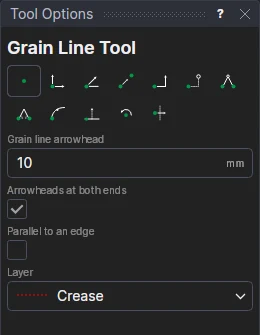
- Fill in the Grain Line Arrowhead size.
- Leave Arrowheads At Both Ends ticked, or untick it for one, at the end.
- Tick Parallel To An Edge to keep the grain line parallel to an edge of the piece (a fold, the centre front).
- Choose the layer to draw on (the patterns in Run Parametric's Sewing folder put grain lines on layer 8).
- With Parallel To An Edge, click the edge first.
- Mark* where the grain line starts, then where it ends. Parallel to an edge, it goes from the first point along the edge's direction, as far as the second.
A grain line that follows the drawing
The arrow is drawn on its two points; parallel to an edge, its end is worked out from the edge's direction, so the arrow keeps parallel to it as the edge turns. The arrowheads' size is kept in a new variable (GRH1), which the next grain lines share.
*Depending on the chosen snap mode, several clicks may be required to define the point parametrically. Read more about Snap Modes