Hinge Bore Tool
Use the Hinge Bore Tool to mark the bores for concealed (cup) hinges along a cabinet door's hinge edge: for each hinge, the 35 mm cup hole and the two fixing holes beside it, as the hinge makers' drilling patterns give them. It is a tool of the carpentry trade.
Usage
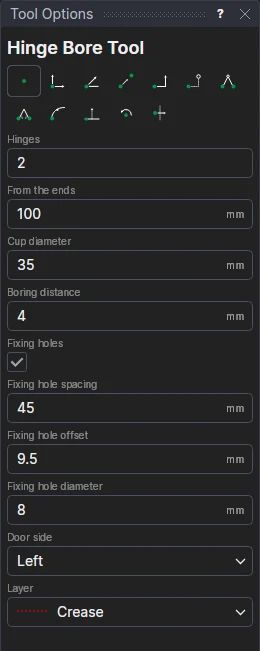
- Fill in the number of Hinges (two for a door up to about 900 mm high, three to 1600 mm, four to 2000 mm) and the distance From The Ends of the edge to the first and last cups' centres (80 to 120 mm is usual).
- Fill in the Cup Diameter (35 mm for most hinges; 26 mm for thin doors) and the Boring Distance: from the door's edge to the cup's rim, 3 to 6 mm as the hinge's data sheet gives it for the overlay wanted.
- Leave Fixing Holes ticked to mark the two holes for the hinge's dowels or screws, and fill in their Spacing (between their centres), Offset (how much further in from the edge they are than the cup's centre) and Diameter: 45, 9.5 and 8 for Blum's press-in dowels; 48 and 6 for Hettich and Grass.
- Choose the Door Side of the edge (going from the first point to the second), and the layer of the bores (a drilling layer, for a CNC router).
- Click* one end of the hinge edge, then the other.
The cups are bored blind, usually 11 to 13 mm deep: say so on the layer, or in a note.
Bores that follow the drawing
The bores are a FOR block on the two points and on new labelled variables: the count (HBN1), the distance from the ends (HBE1), the cup's diameter (HBC1), the boring distance (HBK1), and the fixing holes' spacing, offset and diameter (HBS1, HBO1, HBF1). The next door you bore uses the same sizes, so changing one changes every door's bores. Move an end of the edge (a taller door) and the hinges are spread along it again, those between evenly; one hinge goes in the middle.
In 3D
On a 3D page each cup is bored 13 deep into the door and a concealed hinge shown in it, with its arm and mounting plate (Hardware in 3D).
*Depending on the chosen snap mode, several clicks may be required to define the point parametrically. Read more about Snap Modes