Label Layout Tool
Use the Label Layout Tool to lay out roll labels for a rotary (or flatbed) label die: labels across the web and as many round the die cylinder's repeat as fit. The repeat comes from the cylinder's gear - its number of teeth times the gear's pitch, 1/8 in (3.175 mm) on most label presses - so a die drawn with it always fits its cylinder.
Usage
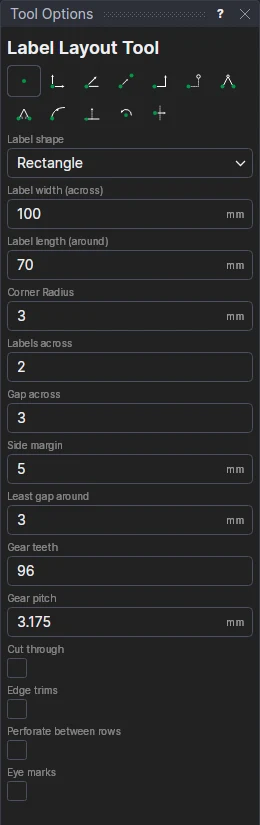
- Choose the Label shape: a rectangle (its corners rounded to the Corner radius, square at 0), round (the width across) or oval.
- Fill in the label's Label width (across) the web and Label length (around) the cylinder, how many Labels across, the Gap across between them and the Side margin of liner (matrix) outside them.
- Fill in the Least gap around you want between labels round the cylinder, and the die cylinder's Gear teeth and Gear pitch.
- Tick Cut through to cut the labels through the liner too (layer 0) instead of kiss-cutting them through the face material only (the Partial cut layer); Edge trims to cut the matrix's sides along the web; and Perforate between rows to perforate across the web between the rows of labels.
- Tick Eye marks for a printed mark in the side margin at the start of each row around, for the press's or the rewinder's sensor, and fill in its Eye mark width (across) and Eye mark length (around) (3 × 6 mm is usual). Each mark is a solid block of colour: its outline filled with a solid FILL, both on the Registration layer (added if the drawing hasn't it), centred in the first side margin, so keep that margin wider than the mark.
- Click* the start of the repeat at the liner's edge, then a point along the web, the way it runs. The labels go across to the right of that direction.
The liner's edges and the repeat (where each turn of the cylinder starts and ends) are drawn on the Dimension layer.
The repeat
The repeat is the gear's teeth times its pitch: 96 teeth at 1/8 in is a 304.8 mm (12 in) repeat. As many labels go round it as fit with at least the least gap between them, and the gap around is then worked out so that they fill the repeat exactly: 70 mm labels with 3 mm gaps on a 96-tooth cylinder are four around, with a gap of 6.2 mm. The first row starts half a gap in from the repeat's start, so the gap where one turn meets the next is the same as the others.
A layout that follows its sizes
Every size becomes a variable, labelled, and so do the sizes worked out from them: the repeat (REPEAT1 = TEETH1 × CP1), the labels around (LBA1), the gap around (LBGA1) and the liner's width (LINERW1); the eye marks' size is LBEW1 × LBEL1, and their fills follow when it changes. Change TEETH1 to try another cylinder and the labels around and their gap follow; change the label's size or the labels across and the liner follows. The labels are a block on the variables and the two points: move the points and the layout moves and turns with them. The options then show the variables, so the next layout shares them.
Add other marks a cutter's camera reads with the Registration Mark Tool, and backing slits with the Liner Slit Tool.
*Depending on the chosen snap mode, several clicks may be required to define the point parametrically. Read more about Snap Modes
See also: Labels, Making a Die.