Tear Strip Tool
Use the Tear Strip Tool to draw a tear strip (a zipper): two perforation lines side by side, the strip of board between them torn away to open a pack. It is a tool of packaging and labels.
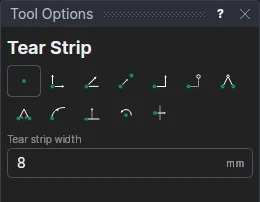
Usage
- Fill in the Tear strip width: the distance between the two perforations.
- Click* where the strip starts.
- Click* where it ends.
The two lines run along the straight path between the points, half the width either side of it, on the Perforation layer. They are defined on the two points, and the width becomes a variable (TSW1) that the next strips share. How the perforations are cut (the cuts and ties) is set in Make Die and on the layer.
*Depending on the chosen snap mode, several clicks may be required to define the point parametrically. Read more about Snap Modes
See also: Bridge Tool, Layers.