Weld Number Tool
Use the Weld Number Tool to number the welds on a spool, isometric or fabrication drawing for a weld map: each weld's number in a balloon with a leader to the joint, and its details - type, size, welding procedure (WPS) and whether it is made in the shop or on site - kept with it, so the Weld map report lists them. It is a tool of the pipework and structural steel trades.
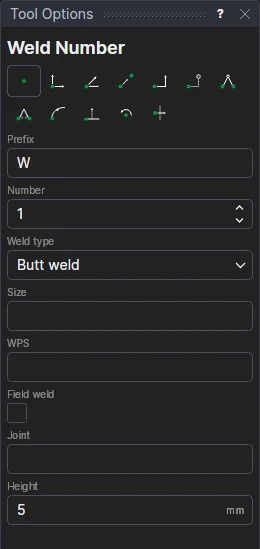
Usage
- Type the Prefix (W, or a spool's number and a dash) and the Number of the first weld; the number goes up by one after each weld.
- Choose the Weld type: Butt weld, Fillet weld, Socket weld, Branch weld or Seal weld.
- Fill in its Size as the weld map lists it (the pipe's diameter and wall, 60.3 × 3.91, or a fillet's leg, 6), its WPS reference, and what the Joint is (pipe to elbow, branch to header), if you want them in the list.
- Tick Field weld for a weld made on site: its number goes in a square; a shop weld's in a circle.
- Set the text Height: the balloon is sized to it.
- Click* the joint, then where the number goes. The status bar says which weld comes next.
The welds go on the Weld map layer, added if the drawing hasn't it.
It follows the drawing
The height is kept in a new labelled variable (WNH1) that the next welds share, and each weld is
drawn by a block on the two points you marked: move the joint or the balloon, or change the
height, and the weld follows. The weld's details are written in the block (WM_INFO = "W3|Butt|60.3 × 3.91|WPS-01|Shop|Pipe to elbow"):
edit them there to change them.
The weld map
File › Reports… › Weld map lists the welds by number with their joint, type, size, WPS and shop or field, and columns for the welder, the date and the inspection (NDT) to fill in. Save it as CSV for a weld log, or as a web page to print with a picture of the drawing and its weld numbers. See Reports.
*Depending on the chosen snap mode, several clicks may be required to define the point parametrically. Read more about Snap Modes
See also: Weld Preparation, Part Mark, Pipework, Structural Steel.