Box Maker
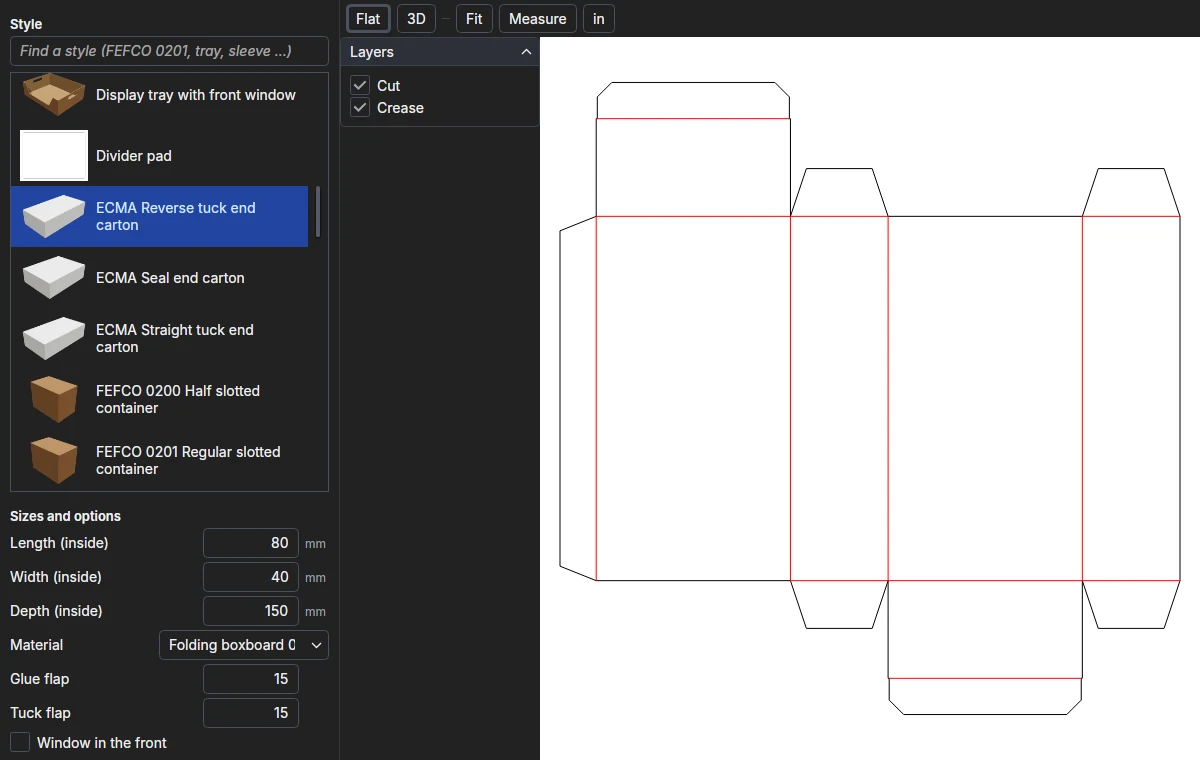
The ParametrIQ Box Maker makes a box from a standard style at the sizes you type. Its styles are the packaging
designs of ParametrIQ CAD's Run Parametric library - FEFCO and ECMA styles, trays, sleeves,
mailers and more - run exactly as CAD runs them, so the dieline is CAD's own. You see it flat or folded up in 3D, and
export it for the sample-maker. It is a separate, free program (PiQ.BoxMaker.App).
Getting the Box Maker
The Box Maker is free: it needs a ParametrIQ account and its own licence, which costs nothing. Ask for it under ParametrIQ Box Maker on your account's Licenses page, download and install the Box Maker, and activate it when it first starts, as Free Apps describes.
Styles
The Style list shows each style with its picture. Type in the box above it to find a style by name (0201,
tray, sleeve). Choosing a style makes the box at its usual sizes.
Sizes and options
Under Sizes and options are the values the style asks for: always its length, width and depth (inside sizes, in
mm), and whatever else the design has - the board, a glue flap, a window, hand holes. Type a size as a number, a
fraction or with a unit (4in). The box is made again as you type; if it can't be made at those sizes, the status
line says why and the last box stays.
The status line also gives the blank's size and the board it takes. Flat, 3D, Fold, Play, Floor, Layers, Measure and the right-click menu work as in the Viewer.
Exporting
Export… writes the dieline in the format chosen by the file type in the save dialog: PDF, DXF, CF2, DDES, SVG,
HP-GL, PNG or a ParametrIQ drawing (.piq) to go on with in CAD. Exporting needs the licence.