MAGNIFIER
A magnifying glass: a circle or rectangle on the drawing, and a callout the same shape somewhere else showing what is inside it, magnified and cut to the callout. A leader joins the two; a text can go under the callout.
Syntax
MAGNIFIER CIRCLE,from,to,centre,edge,"text"
MAGNIFIER RECTANGLE,from,to,centre,edge,"text"
MAGNIFIER @id,CIRCLE,from,to,centre,edge,"text",layer,KEY=value,…
| Argument | Meaning |
|---|---|
| CIRCLE or RECTANGLE | The shape of the area magnified and of the callout. |
| from, to | The area: a circle's centre and a point on it, or a rectangle's opposite corners (its sides square to the axes). |
| centre | The callout's centre. |
| edge | The callout's size: a point on the callout's circle, or as far from its centre as its corners are (a rectangle callout keeps the area's proportions). |
| "text" | The text under the callout, in double quotes ("" for none). \n starts a new line. |
The magnification is the callout's size over the area's: the distance from centre to edge over the area's radius
(or half its diagonal). The id, layer and any settings after it are the element settings;
the KEY=value settings are the dimension settings for its text (HEIGHT, GAP for
the space under the callout, KIND, FONT, BOLD, ITALIC, WIDTH).
Examples
P1=[50,50]
P2=[60,50]
P3=[150,120]
MAG1=3
P4=P3+(P2-P1)*MAG1
MAGNIFIER CIRCLE,P1,P2,P3,P4,"Detail A",8
P5=[0,0]
P6=[40,20]
P7=[100,-60]
P8=P7+(P6-P5)/2*2
MAGNIFIER RECTANGLE,P5,P6,P7,P8,"Corner, twice size",8
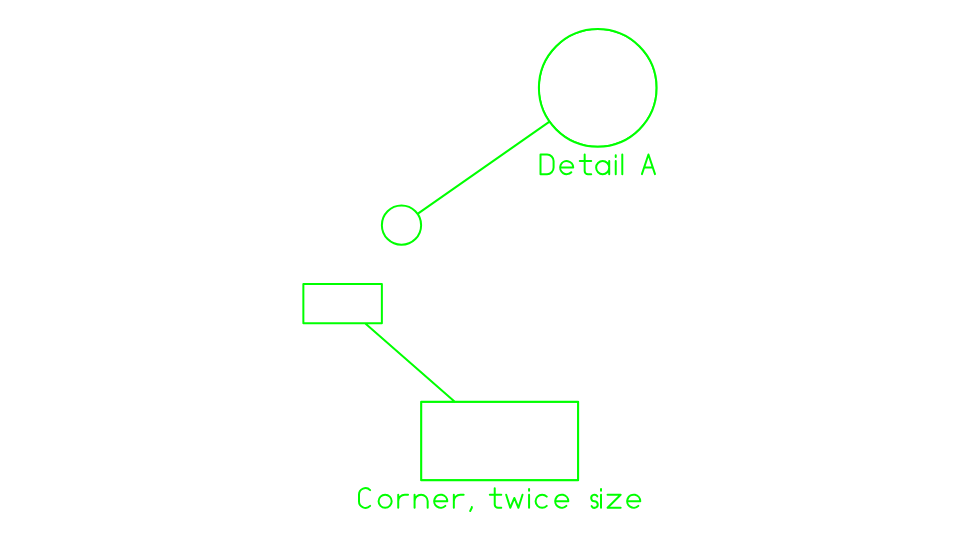
With the edge defined from a variable, as the Magnifier Tool makes it, changing the
variable (MAG1 above) resizes the callout.
Notes
What the callout shows is drawn after the rest of the drawing, over a background of its own. A magnifier whose area takes in another magnifier's callout shows it too, up to three deep. PDF, Illustrator, EPS, PostScript, SVG and image exports cut the view to the callout with a clipping path; DXF, CF2 and DDES3 get its outlines, leader and text.
See also: Magnifier Tool, CALLOUT.