Pallet and Case Planner
The ParametrIQ Pallet and Case Planner works out how to pack a product: how many units go in a case each way they
fit, the case each way makes, and how those cases load onto a pallet within its height and weight limits, laid out as
ParametrIQ CAD's pallet scene lays them. You see the chosen case on its pallet in 3D and
export its dieline. It is a separate, free program (PiQ.Pallet.App).
Getting the Pallet and Case Planner
The Pallet and Case Planner is free: it needs a ParametrIQ account and its own licence, which costs nothing. Ask for it under ParametrIQ Pallet and Case Planner on your account's Licenses page, download and install it, and activate it when it first starts, as Free Apps describes.
What is packed
Choose Units into cases to plan the case too, or A case I have to load a case you already use.
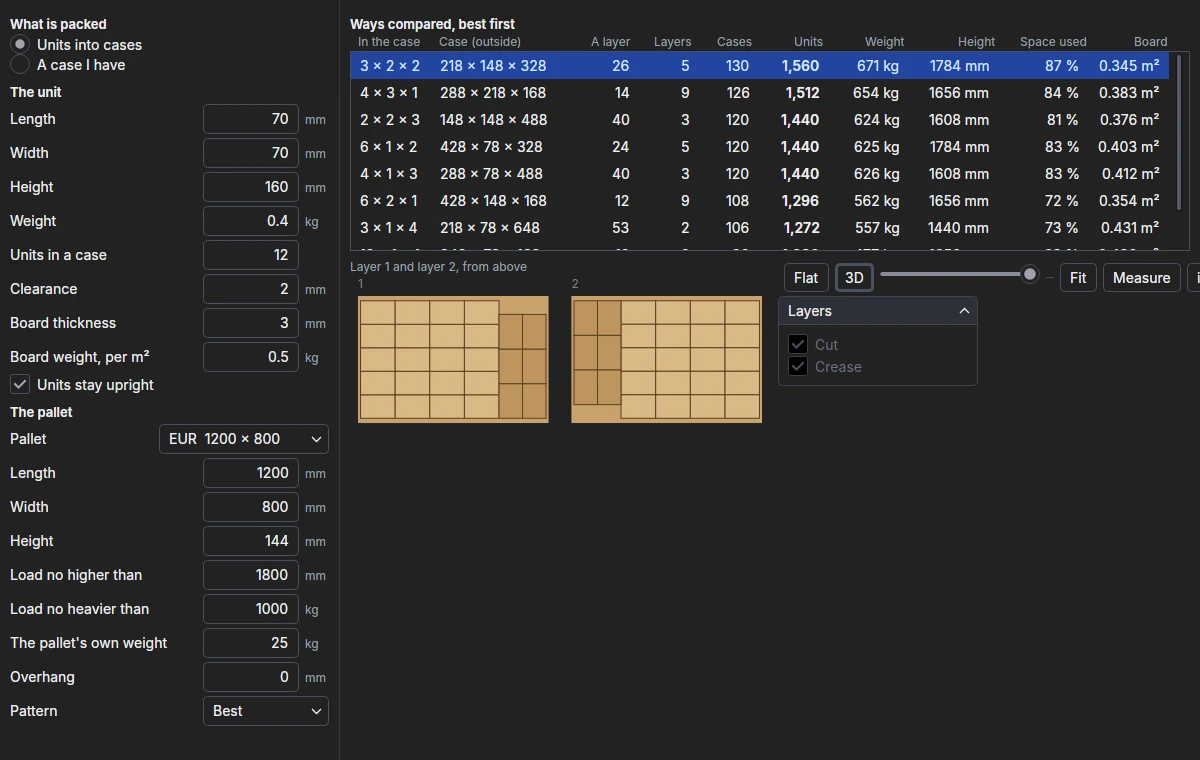
For units, type the unit's Length, Width, Height and Weight, the Units in a case, the Clearance left round them, the Board thickness, and the Board weight, per m². With Units stay upright on, a unit stands on its base, turned either way; off, it may lie on any side. For a case, type its outside Length, Width and Height and its Full weight.
The pallet
Choose a Pallet (EUR, EUR2, UK, EUR3, EUR6, GMA, AU or ISO, which fill in its size) or type its Length, Width and Height. Then:
| Setting | What it does |
|---|---|
| Load no higher than | The highest the load may be, the pallet included. |
| Load no heavier than | The heaviest it may be, the pallet included. |
| The pallet's own weight | Counted in the load's weight. |
| Overhang | How far cases may stand past each edge of the deck. |
| Pattern | Best (whichever puts more cases on a layer), Column (every case the same way) or Interlock (two blocks at right angles, every other layer turned half round so the joints cross). |
The ways compared
Every way the units go in a case is loaded on the pallet, as many layers as keep it under both limits, and listed best first: the most units on the pallet, then the least board a case. A way whose case is too tall or too heavy for even one layer is left out. Each line gives the units in the case (along × across × up), the case's outside size, the cases on a layer, the layers (marked * when the weight, not the height, decides), the cases and units on the pallet, the load's weight and height, how much of the load's space the cases fill, and the board a case takes.
Click a way to see its first two layers from above, turned cases a shade darker, and the case on its pallet in 3D: the library's FEFCO 0201 at the case's inside size, stacked as the pallet scene stacks it.
Exporting
Export case… writes the chosen case's dieline (the FEFCO 0201 at its inside size) in the format chosen by the file type in the save dialog. Save list… saves the ways compared as a list (CSV) for a spreadsheet. Both need the licence.