Sheet Yield Calculator
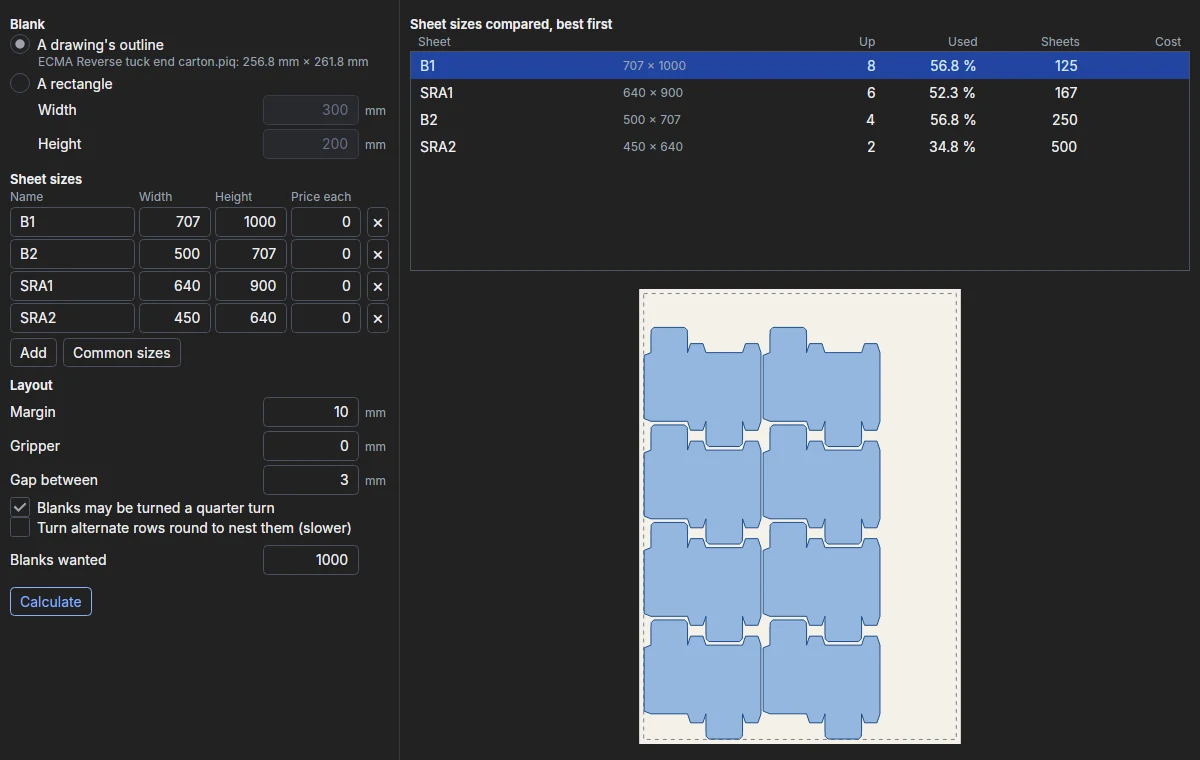
The ParametrIQ Sheet Yield Calculator lays a blank on each of your sheet sizes as ParametrIQ CAD's
NEST lays it - in rows and columns, turned and nested into each other - and compares the sizes:
how many up each takes, how much of the sheet is used, and what the sheets for your quantity cost. It is a separate,
free program (PiQ.Yield.App).
Getting the Sheet Yield Calculator
The Sheet Yield Calculator is free: it needs a ParametrIQ account and its own licence, which costs nothing. Ask for it under ParametrIQ Sheet Yield Calculator on your account's Licenses page, download and install it, and activate it when it first starts, as Free Apps describes.
The blank
Under Blank, choose:
- A drawing's outline: click Open… and choose a dieline (or drop one on the window). Its outline is the outside of its cut lines, as NEST takes it, so the flaps of a carton nest into each other.
- A rectangle: type its Width and Height.
Sheet sizes
List the sheets to try, each with a Name, its Width and Height, and its Price each (leave 0 if you don't want costs). Add adds a sheet, ✕ removes one, and Common sizes adds the usual board and sheet sizes.
Layout
| Setting | What it does |
|---|---|
| Margin | Kept clear round the sheet's edge. |
| Gripper | More kept clear at the leading edge, for the press's grippers. |
| Gap between | Between blanks; 0 for common cuts. |
| Blanks may be turned a quarter turn | Off keeps them upright, for the grain or the print. |
| Turn alternate rows round to nest them | Tries every other row turned half round. It can fit more, but takes longer. |
| Blanks wanted | The quantity the sheets and their cost are worked out for. |
Results
Click Calculate (on the toolbar or under the settings). Each sheet size is laid out in turn - Cancel stops it - and listed best first: the lowest cost for your quantity, then the most up, then the least waste. The list gives each size's number up, the share of the sheet used, the sheets for your quantity and their cost. Click a size to see its layout below: the sheet, its margin (dashed) and gripper (red), and each blank.
Save list… saves the results as a list (CSV) for a spreadsheet; it needs the licence.