Spooler
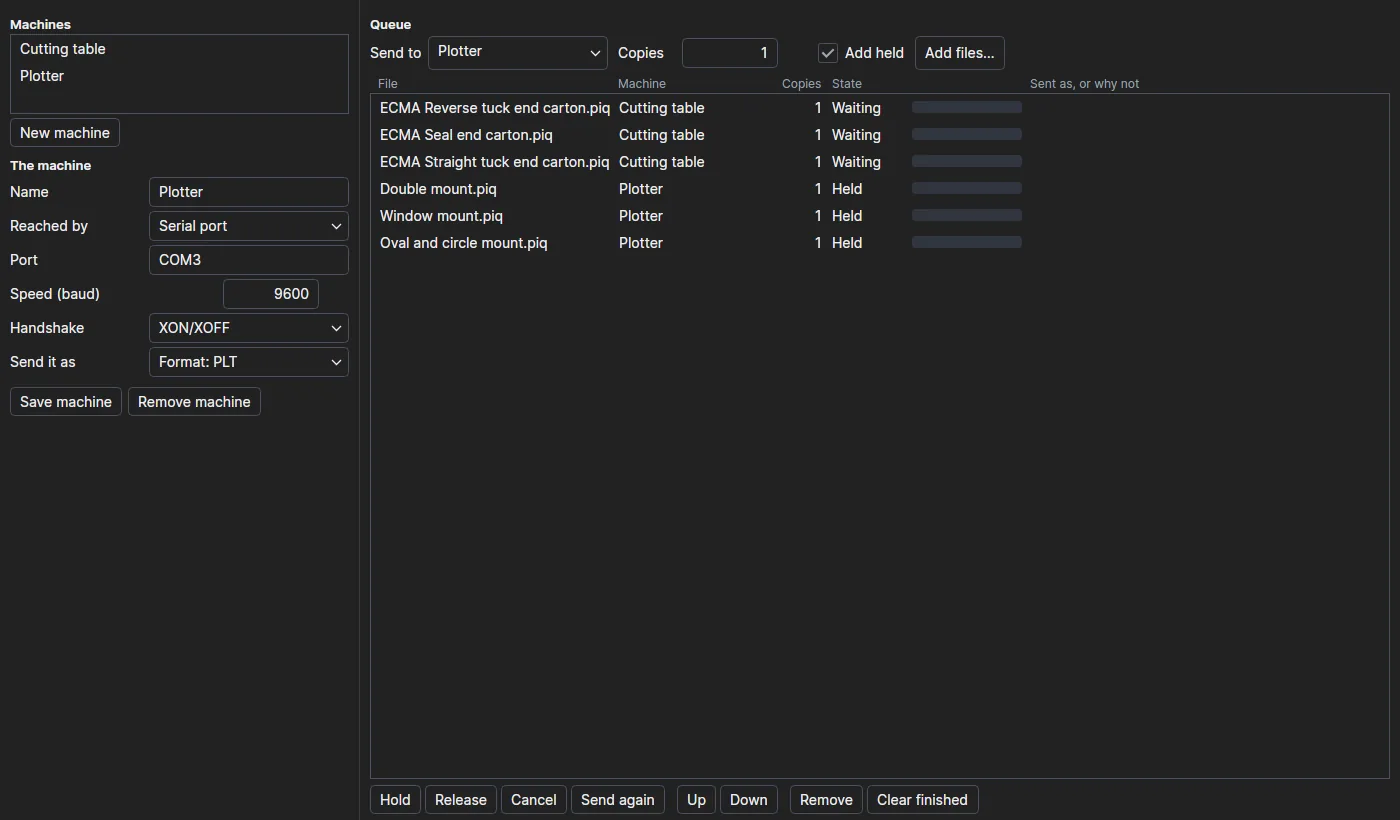
The ParametrIQ Spooler keeps a queue of jobs for each of your machines and sends them, one at a time a machine:
to a folder the machine reads, its network port, its serial port or the Machine Emulator. On the way,
each drawing is made into the machine's machine profile or format with ParametrIQ CAD's own
writers. It is a separate, free program (PiQ.Spooler.App).
Getting the Spooler
The Spooler is free: it needs a ParametrIQ account and its own licence, which costs nothing. Ask for it under ParametrIQ Spooler on your account's Licenses page, download and install it, and activate it when it first starts, as Free Apps describes. Until it is activated, jobs can be queued but wait to be sent.
Machines
New machine starts one; choose one in Machines to change it. Give it a Name, say how it is Reached by, choose what to Send it as, and click Save machine.
| Reached by | Settings | Sends |
|---|---|---|
| A folder it reads | The Folder | The file written beside it first, then moved in, so the machine never reads half a file |
| Network port | Its Address and Port (9100, a raw port) | The job straight to the port |
| Serial port | The Port, Speed (baud) and Handshake | The job down the cable |
| Machine emulator | local, or its address |
The job and the drawing's tools, as ParametrIQ CAD sends them |
Send it as is The file as it is, a Format (PDF, DXF, CF2, DDES, SVG, HP-GL, PNG), or a Profile: one of ParametrIQ CAD's machine profiles or your own from CAD, which writes the layers named, coloured and penned as the machine wants them and names the file as the profile says.
The queue
Choose the machine in Send to, how many Copies, and click Add files… (or drop files on the window). With Add held ticked they wait until released.
Each machine's jobs go one at a time in the list's order; different machines send at once. The list shows each job's machine, copies, state (Waiting, Held, Sending, Sent, Failed, Cancelled), how far it has gone, and the name it was sent as or, in red, why it failed.
| Button | What it does |
|---|---|
| Hold and Release | Keeps a waiting job back, or lets it go. |
| Cancel | Stops a job: one being sent stops where it is. |
| Send again | Sends a sent, failed or cancelled job again, at the end of the queue. |
| Up and Down | Moves a job earlier or later. |
| Remove and Clear finished | Takes a job, or the sent and cancelled ones, out of the list. |
Pause sending on the toolbar stops sending (a job being sent waits to go again) until Resume sending. The machines and the jobs not yet sent are kept, and a job being sent when the Spooler closed goes again when it starts.