Bezier Tool
Use the Bezier Tool to draw a smooth curve between two points, shaped by control points that pull the curve towards them without it passing through them.
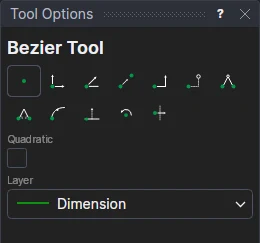
Usage
- Choose the kind of curve. Tick Quadratic for a curve with one control point; leave it clear for a cubic curve with two, which can make S-shapes.
- Choose the layer to draw the curve on.
- Click* the start point.
- Click* the end point.
- Click the control point. For a cubic curve, click the first control point (near the start), then the second (near the end).
The curve is shown as you move, before each click.
*Depending on the chosen snap mode, several clicks may be required to define the point parametrically. Read more about Snap Modes