Circle Tool
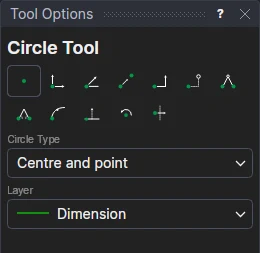
Use the Circle Tool to draw a circle. Choose how with Circle Type:
| Circle Type | Click | The circle |
|---|---|---|
| Centre and point | The centre, then a point on the circle | Through the point; moving it changes the radius. |
| Centre and radius | The centre | The Radius given (a number or any expression). It is kept in a new variable (RAD1, RAD2 …): change the variable and the circle grows or shrinks. |
| Two points | Two points opposite each other on the circle | Through both, its centre a new point half way between them, which follows them. |
Usage
- Choose the Circle Type (and, for Centre and radius, the Radius), and the layer to draw on.
- Click* the points in the order shown above. The circle is shown as you move.
Every point is an existing point, one defined relative to one, or (the centre between two points, the point at a radius) one worked out from them, so nothing about the circle is fixed in space.
*Depending on the chosen snap mode, several clicks may be required to define the point parametrically. Read more about Snap Modes