Dart Tool
Use the Dart Tool to draw a dart on a pattern piece: a wedge folded out and sewn, to shape flat fabric round a curve (a waist, a bust, a hip).
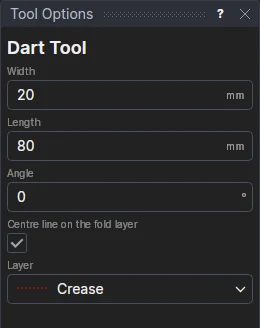
Usage
- Fill in the dart's Width (across its opening at the edge), Length (from the edge to its point) and Angle (how far it is turned from square to the edge, in degrees: 0 for square).
- Leave Centre Line On The Fold Layer ticked to draw the dart's centre line, where it is folded, on layer 1.
- Choose the layer for the dart's legs (its sewing lines: layer 4, dashed, as the patterns in Run Parametric's Sewing folder have them).
- Click the edge where the dart opens. On a closed outline the dart goes into the piece; on a line, to the side of it you click. The dart is shown as you move.
A dart that follows the drawing
The dart stays a fraction of the way along the edge, and is symmetric about its centre line: its legs are the same length, and its opening is square to the centre line. Its width (DTW1), length (DTL1) and angle (DTA1) are new variables: change them, or the edge, and the dart follows.