Gasket Ring Tool
Use the Gasket Ring Tool to draw a flat gasket round a centre: its bore and outside circles, and its bolt holes. The sizes are typed, or come from a flange standard. It is a tool of the gaskets and pipework trades.
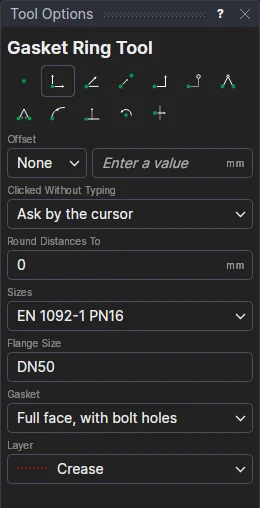
Usage
- Choose where the Sizes come from:
- EN 1092-1 PN16 (DN15 to DN200) or ASME B16.5 Class 150 (NPS ½ to 12): type or choose the
Flange Size (
DN50,NPS 4…), and choose the Gasket: a Ring inside the bolts (its outside just inside the bolt holes), or Full face, with bolt holes (to the flange's outside). - Sizes typed: fill in the Bore and Outside Diameter; tick Bolt Holes for holes, and fill in the Pitch Circle Diameter, the number of Holes and the Hole Diameter.
- EN 1092-1 PN16 (DN15 to DN200) or ASME B16.5 Class 150 (NPS ½ to 12): type or choose the
Flange Size (
- Choose the layer to cut on.
- Click* the centre. The gasket is shown round the pointer as you move.
The bolt holes straddle the centre lines, as a flange's do.
It follows the drawing
For a standard, the flange size is a new labelled variable (GSIZE1) choosing from all the standard's sizes, as the Run Parametric library's gasket designs have it: choose another size in the Variables panel, and the gasket's outside (GOD1), bore (GID1), bolt circle and holes (PCD1, HOLES1, HOLED1), worked out from it, change with it. Typed sizes are kept in new variables too. The circles and the holes are drawn round the point you marked, so they follow it. The holes are a bolt circle, as the Hole Pattern Tool draws.
The standards' sizes are those of the library's EN 1092-1 PN16 and ASME Class 150 gasket designs. Check them against the standard and your flanges before cutting.
*Depending on the chosen snap mode, several clicks may be required to define the point parametrically. Read more about Snap Modes