Gusset Plate Tool
Use the Gusset Plate Tool to draw a gusset or stiffener plate in the corner between two members: a triangle (its toes cut square) or a rectangle, its inside corner sniped to clear the weld and the root radius. It is a tool of the structural steel and sheet metal trades.
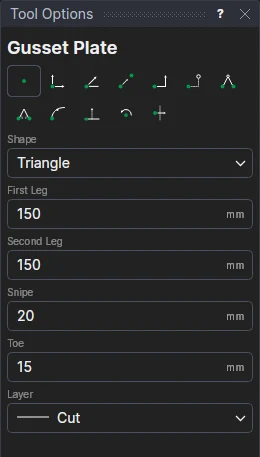
Usage
- Choose the Shape: Triangle (a gusset) or Rectangle (a stiffener).
- Fill in the First Leg and Second Leg: how far the plate runs along each member from the corner.
- Fill in the Snipe: how far along each leg the inside corner is cut off (about the weld's leg or the root radius, 15 to 25 mm; 0 leaves it square).
- For a triangle, fill in the Toe: how wide each sharp end is cut square (0 leaves them sharp).
- Choose the layer to draw on.
- Click* the corner where the two members meet, then a point along the first member, then a point along the second. Only the directions of those two points from the corner count, so the members needn't be square to each other.
It follows the drawing
The legs, snipe and toe are kept in new labelled variables (GUA1, GUB1, GUS1, GUT1), and the plate is drawn by a block on the three points you marked: move them, or change a variable, and the plate follows.
*Depending on the chosen snap mode, several clicks may be required to define the point parametrically. Read more about Snap Modes
See also: Base Plate, Hole Pattern, Structural Steel.