Liner Slit Tool
Use the Liner Slit Tool to draw a backing slit: a cut through the liner (the backing paper) only, made from the back, so the backing can be peeled away in two and the label lifted easily. A shaped slit - a zigzag or a wave - is easier to find and peel than a straight one.
Usage
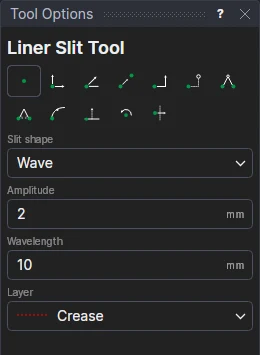
- Choose the Slit shape: Straight, Zigzag or Wave.
- For a zigzag or a wave, fill in its Amplitude (how far it goes either side of the line) and about its Wavelength: as many whole waves as fit go between the points, so the slit starts and ends on the line.
- Choose the Layer: the one your back slitting is cut from.
- Click* the slit's start, then its end.
The amplitude and wavelength become variables (SLA1, SLW1), and the slit is a block on them and the two points: move a point, or change a variable, and the slit follows.
*Depending on the chosen snap mode, several clicks may be required to define the point parametrically. Read more about Snap Modes
See also: Label Layout Tool, Labels.