Slot Tool
Use the Slot Tool to draw a slot (a slotted hole, an obround): two straight sides and a half circle at each end, as one closed polyline. Slots let a part be adjusted when it is fixed. It is a tool of the sheet metal, structural steel, laser cutting and gaskets trades.
Usage
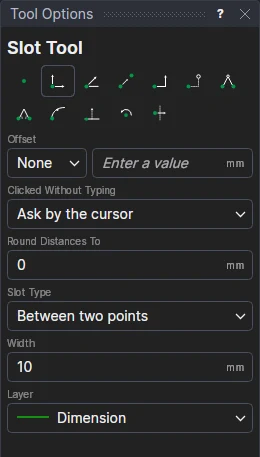
- Choose the Slot Type:
- Between two points: the slot runs between two points, the centres of its round ends.
- Centre, length and angle: the slot goes round a centre, its overall Length (from end to end, the round ends included) and Angle (degrees anticlockwise from the X axis) from the options.
- Fill in the Width (the fixing's clearance).
- Choose the layer to draw on.
- Click* the first end's centre, then the second's; or the centre. The slot is shown as you move.
It follows the drawing
The width is kept in a new labelled variable (SLOTW1 …), and the length and angle too (SLOTL1, SLOTA1). The slot's four corners are new points worked out from the points you marked and those variables, and its ends are half circles whatever its size: move a point, or change a variable, and the slot follows. Nothing is fixed in space.
*Depending on the chosen snap mode, several clicks may be required to define the point parametrically. Read more about Snap Modes